
Tiders x402 Server
Tiders x402 Server lets you sell access to your data — install the server, point it at your database, set a price, and anyone on the internet can make micro payments to query your data instantly, with no contracts, accounts, or billing setup.
Buyers submit SQL queries over HTTP and receive results as efficient Apache Arrow IPC streams. You control what data is exposed, which tables are available, and how much each query costs — per row returned or a flat fee to access a table. Buyers interact using familiar SQL, but Tiders enforces a safe subset — blocking expensive operations like JOINs and subqueries — so your database stays protected and costs stay predictable.
Payments are handled by the x402 protocol, an open standard for HTTP-native micropayments. When a server needs payment it returns a standard 402 Payment Required response; a client with x402 support signs it, and the transaction settles in under a second using stablecoins — no accounts, no checkout pages, no minimum spend.
Under the hood, Tiders is a Rust server that connects to different databases such as DuckDB, PostgreSQL, or ClickHouse. Buyers query using familiar SQL, but Tiders enforces a safe subset — blocking expensive operations like JOINs and subqueries — so your database stays protected and costs stay predictable.
Serving raw data from your database through a paid API is the server’s core job. As an optional addition — because selling data is hard without showing buyers what they’re getting — the same server application can scaffold and publish interactive dashboards: fully customizable visual reports you design and your buyers explore in a browser, with a convenience button that hits the server’s x402-gated APIs to download the underlying data. The server works exactly the same with or without dashboards.
Think of the dashboard feature as a vending machine for data: buyers browse the dashboard to preview what’s available, then pay per request to access the full dataset. You stay in full control — what data is freely visible in the dashboard, which tables the server exposes, and how much each query costs, whether that’s per row returned or a flat fee to access a table.
New Here? Start with the Full Stack Example
tiders-stack repo is a ready-to-run end-to-end example that wires up a complete Tiders environment from scratch: ingestion pipeline, database, server config, dashboard, and a paying client — all in one repo. If you don’t have data or infrastructure already set up, start there before continuing here.
Three Ways to Use
| Mode | How | When to use |
|---|---|---|
| CLI Application | Install, write a YAML config file with available tables and prices, run tiders-x402-server start | Quick setup, no coding required, config-driven deployments |
| Dashboards | Optional dashboards can be scaffold with teh CLI’s tiders-x402-server dashboard <slug> and are fully customizable | Published alongside the API endpoints, allow buyers browse the data |
| SDK Library | Import in Rust, configure programmatically | Modifying server standard bahavior, embedding in larger rust applications, maximum flexibility |
See CLI Quick Start to get started.
Key Features
- Pay-per-query data access — charge a flat fee, per row returned, or a one-time fee for table metadata
- Tiered pricing — volume tiers, multiple tokens, and multiple networks per table
- Multiple databases — DuckDB, PostgreSQL, and ClickHouse backends
- CLI and SDK — run from a YAML config file (no code) or embed as a Rust/Python library
- Apache Arrow responses — efficient binary columnar format, significantly faster than JSON
- Safe SQL subset — parser blocks JOINs, GROUP BY, subqueries, and other expensive operations
- Embedded dashboards — scaffold and serve Evidence dashboards from the same binary, with x402 wallet-connect download buttons baked in
- Hot reload — tables, pricing, facilitator settings, and dashboard config reload on file change without a restart
- Observability — built-in OpenTelemetry tracing support
How Paid Requests Work
- A client sends a SQL query to
GET /api/query?query=…. - The server parses and validates the query, then estimates the payment options.
- If payment is required, the server responds with HTTP 402 and a list of payment options.
- The client signs a payment using their crypto wallet and resends the request with a
Payment-Signatureheader. - The server verifies and settles the payment through a facilitator, then returns the query results as Arrow IPC.
Endpoints at a Glance
| Path | Purpose |
|---|---|
GET / | Dashboards landing page (only when dashboards: is configured) |
GET /<slug>/ | Static Evidence dashboard, one per dashboards: entry |
GET /api/ | Server discovery document: tables, pricing, endpoints, version |
GET /api/query?query=… | Submit a SQL query (paywalled per the table’s price tags) |
GET /api/table/{name} | Full schema and pricing for a single table |
Project Structure
tiders-x402-server/
  server/          # Rust server library + CLI binary (Axum-based REST API + dashboard scaffolder)
    src/
      cli/           # YAML config loader, YAML validator, file watcher
      dashboard/     # Dashboard config, routes, scaffolder + embedded Evidence templates
      database/      # Database trait + DuckDB / PostgreSQL / ClickHouse backends + SQL parser/generators
      payment/       # Pricing model, payment config, x402 verify/settle, facilitator client
      handler_api_*.rs # Axum handlers for /api/, /api/query, /api/table/{name}
      lib.rs         # Server bootstrap (router, middleware, OTLP, graceful shutdown)
  cli-python/      # Python wheel that ships the CLI binary (pip install tiders-x402-server)
  examples/        # Python, Rust, and CLI server examples + sample data
  docs/            # mdBook documentation
  Cargo.toml       # Workspace configuration
Technology Stack
| Component | Technology |
|---|---|
| Web framework | Axum |
| Database | DuckDB, ClickHouse, PostgreSQL |
| Payment protocol | x402 V2 (via x402-rs types and x402-chain-eip155) |
| Data serialization | Apache Arrow IPC |
| SQL parsing | sqlparser |
| Blockchain primitives | Alloy |
| Dashboards | Evidence (Svelte) + wagmi + viem + @x402/evm |
| Observability | OpenTelemetry + tracing |
Installation
CLI
The CLI is distributed as a prebuilt binary via both pip and cargo. Pick whichever you prefer — they install the same tiders-x402-server binary with all database backends bundled.
pip install tiders-x402-server
# or
cargo install tiders-x402-server
Once installed, see the CLI Quick Start to get running.
Rust SDK
By default tiders-x402-server enables all three database backends and the CLI dependencies. If you’re embedding it as a library and only need one backend, opt out of the defaults:
| Feature | Description |
|---|---|
duckdb | DuckDB backend |
postgresql | PostgreSQL backend |
clickhouse | ClickHouse backend |
cli | CLI/YAML loader, file watcher, and related deps (default) |
[dependencies]
tiders-x402-server = { version = "0.2", default-features = false, features = ["duckdb"] }
Or combine multiple backends:
[dependencies]
tiders-x402-server = { version = "0.2", default-features = false, features = ["duckdb", "clickhouse", "postgresql"] }
Running the example:
cd examples/rust
cargo run
The Rust example (examples/rust/Cargo.toml) enables all three backends. Edit its features list if you only need one.
Development Setup
Build the CLI from source:
cargo install --path server
If you’re modifying tiders-x402-server repo locally, you probably want to build the example against your local version:
Build the example with the local repo:
cargo build --config 'patch.crates-io.tiders-x402-server="../../server"'
Persistent local development
For persistent local development, you can put this in examples/rust/Cargo.toml:
[patch.crates-io]
tiders-x402-server = { path = "../../server" }
This avoids passing --config on every build command.
CLI Quick Start
The CLI is the fastest way to run a tiders-x402-server — no code required. Write a YAML config file, point the CLI at it, and the server is live.
No data or infrastructure yet? Check out the tiders-stack repo — a complete end-to-end example that sets everything up from scratch (ingestion, database, server, dashboard, and paying client) in a single repo. It’s the fastest way to see the full system in action before you bring your own data.
Tiders-x402-server assumes you already have a database populated with the data you want to sell. If you don’t, the Tiders ingestion tool can help you stand one up and load it with crypto data — see Choosing a Database for guidance on picking a backend.
1. Install
pip install tiders-x402-server
# or
cargo install tiders-x402-server
Both commands install the same tiders-x402-server binary with DuckDB, PostgreSQL, and ClickHouse backends bundled.
2. Create a Config File
Create a file called tiders-x402-server.yaml:
server:
  bind_address: "0.0.0.0:4021"
  base_url: "http://localhost:4021"

facilitator:
  url: "https://facilitator.x402.rs"

database:
  duckdb:
    path: "./data/my_data.duckdb"

tables:
  - name: my_table
    description: "My dataset"
    price_tags:
      - type: per_row
        pay_to: "0xYourWalletAddress"
        token: usdc/base_sepolia
        amount_per_item: "0.002"
        is_default: true

dashboard: # Optional
  entries:
    - slug: my_dashboard
      title: "My Dashboard"
      description: "Description text for the dashboard"
      tags: ["Tag1", "Tag2"]
This is a minimal config. See the YAML Configuration Reference for all options.
3. Environment Variables
Use ${VAR_NAME} placeholders anywhere in the YAML to keep secrets and environment-specific values out of your config file. This works for any string field — provider URLs, credentials, file paths, etc.
database:
  postgresql:
    connection_string: "host=${PG_HOST} user=${PG_USER} password=${PG_PASSWORD} dbname=tiders"
At startup, the CLI automatically loads a .env file from the current working directory (and parents), then substitutes all ${VAR_NAME} placeholders with their values. If a variable is referenced in the YAML but not defined, the CLI raises an error.
Create a .env file alongside your config:
PG_HOST=localhost
PG_USER=postgres
PG_PASSWORD=secret
You can also point to a different .env file using --env-file:
tiders-x402-server start --env-file /path/to/.env
4. Validate (optional)
Before starting, check that the config parses and the database is reachable:
tiders-x402-server validate
On success it logs the number of registered tables; on failure it prints a descriptive error and exits non-zero.
5. Start the Server
# Auto-discovers the config file in the current directory
tiders-x402-server start

# Or specify the path explicitly
tiders-x402-server start path/to/config.yaml
The CLI auto-discovers .yaml/.yml files in the current directory that contain the required top-level keys (server, facilitator, database). If exactly one candidate is found, it is used automatically.
By default the CLI watches the config file for changes and hot-reloads tables, pricing, facilitator settings, and dashboard configuration without restarting. Disable this with --no-watch.
6. Verify
curl http://localhost:4021/api/
You should get a JSON discovery document listing your tables, pricing tiers, and endpoints.
To run a query:
curl --get http://localhost:4021/api/query \
  --data-urlencode "query=SELECT * FROM my_table LIMIT 10"
# Returns 402 with payment options
Use one of the client scripts (Python or TypeScript) to handle the x402 payment flow end-to-end.
7. Create the dashboards (optional)
You can create dashboards before or after starting the server. Scaffold all dashboards defined in the YAML at once, or a specific one by slug:
tiders-x402-server dashboard          # scaffold all entries
tiders-x402-server dashboard <slug>   # scaffold one
This copies a minimal Evidence project template into <dashboards>/<slug>/. From there, edit the files, mainly <dashboards>/<slug>/pages/index.md, to build your reports — the Evidence docs cover the full dashboard authoring workflow.
Note: Data visible in the dashboard can be scraped freely without payment. Only expose data you are comfortable sharing publicly, and leave anything sensitive behind the paid API instead.
Once the dashboard is ready, build it into a static site:
(cd <dashboards>/<slug> && npm install && npm run build)
The server will pick up and serve the built files automatically. Dashboards are static — they do not update live. Rebuild whenever the underlying data changes.
Next Steps
- CLI Overview — commands, auto-discovery, hot-reload, logging
- YAML Configuration Reference — all config sections and options
- Dashboards — scaffold and serve Evidence dashboards from the same binary
- API Endpoints — the HTTP API exposed by the server
- Payment Flow — how the x402 payment protocol works
Dashboards
Tiders can publish Evidence dashboards alongside its paid API — let buyers preview your data visually before deciding to pay for the full dataset.
Each dashboard is an Evidence project: a folder of Markdown files with embedded SQL queries that compile into a fast, self-contained static website. Tiders scaffolds the project for you, pre-wires it to your database, and serves the built site at /<slug>/. Dashboards are optional — omit the dashboards: block and the server only exposes /api/*.
When at least one dashboard is configured, the root path / becomes a generated landing page listing every dashboard. Each dashboard also ships with a built-in wallet-connect button: visitors can connect a crypto wallet directly in the page and pay to download the underlying updated table as a CSV — the full x402 payment flow, with no extra code required on your end.
Dashboards are static — they do not update live. Whenever the underlying data changes, rebuild the project and the server picks up the new files automatically.
Note: Content rendered in the dashboard is publicly visible and can be scraped without payment. Only show data you are comfortable sharing freely; keep sensitive tables behind the paid API.
Why Evidence
Evidence is a static-site generator built for data dashboards. Pages are witten with commands in Markdown files with embedded SQL queries — accessible to data engineers and analysts, yet flexible enough for rich charts, narrative context, and programmatic logic. At build time, npm run build runs the queries, writes the results to Parquet files, and bundles everything into a static site. At runtime, the server just serves HTML, JS, and CSS — no database calls, no server-side rendering, making pages fast and lightweight.
Workflow
- Add an entry under
dashboards:in your config (see YAML Reference). - Scaffold the project:
tiders-x402-server dashboard <slug>. - Edit the files creating your dashboard page.
- Build it:
cd dashboards/<slug> && npm install && npm run build. - Start the server:
tiders-x402-server start. The built site is served at/<slug>/.
The same flow applies to refreshes: edit your pages/*.md, rerun npm run build, and the live server picks up the new files (no restart needed).
Quick Example
# tiders-x402-server.yaml

dashboards:
  entries:
    - slug: uniswap_v3
      title: "Uniswap V3"
      description: "Pool swaps and liquidity events on Uniswap V3."
      tags: ["Dex", "DeFi", "Ethereum"]
tiders-x402-server dashboard uniswap_v3
cd dashboards/uniswap_v3 && npm install && npm run build
cd ../.. && tiders-x402-server start
Open http://localhost:4021/ for the landing page or http://localhost:4021/uniswap_v3/ for the dashboard itself.
Scaffolded Project Layout
dashboards/
  index.html                  # generated landing page snapshot
  <slug>/
    pages/
      +layout.svelte          # wraps the page with Tiders components (overwritten on --force)
      index.md                # (edit) user-owned dashboard main page (created once, never overwritten)
    sources/                  # dashboard data sources referenced in the pages
      <source_name>/
        connection.yaml       # (edit) evidence database connection credetials: (DuckDB / PG / ClickHouse)
        <table>.sql           # (edit) database sourced sql files: `select * from <table> limit 10`
    components/               # Tiders custom components and libraries.
      ConnectButton.svelte
      WalletPicker.svelte
      TidersDownloadButton.svelte
      TidersDownloadModal.svelte
      lib/
        eip6963.ts            # wallet discovery
        wagmi.ts              # wagmi config
        walletStore.ts
        x402Client.ts         # x402 payment + Arrow IPC fetch
        arrowToCsv.ts
    build/                    # produced by `npm run build` (served at runtime)
    .tiders-managed.json      # sha256 manifest of every managed file (drift detection)
    .npmrc
    .gitignore
    package.json
    evidence.config.yaml      # evidence configs
(edit) are the main files users need to edit.
Multi-page Dashboard vs Multiple Dashboards
Evidence supports multiple pages within a single dashboard project — just add more .md files under pages/. You can use this to group related data into sections within one site, or create separate dashboard entries in Tiders for each group.
| Single dashboard, multiple pages | Multiple dashboards | |
|---|---|---|
| Build | One npm run build covers everything | Each project builds independently |
| Linking | Easy cross-page navigation and shared components | Separate sites; linking requires full URLs |
| Isolation | A change anywhere requires a full rebuild | Rebuild only the affected dashboard |
Use multiple pages when your content is closely related and you want a unified site. Use separate dashboards when the topics are independent and you want to rebuild or deploy them separately.
Hot-Reload of dashboards:
The CLI watches the YAML config and atomically swaps the live dashboard router (arc-swap) when entries are added, removed, enabled, or disabled.
Bundled Wallet Connect + Paid Download
The TidersDownloadButton + TidersDownloadModal components embedded in every scaffolded project handle the full x402 dance:
- Discover EIP-6963 wallets in the browser.
- Let the user pick one and connect via wagmi.
- Submit a query to
/api/query, intercept the 402, and prompt the user to sign the payment via@x402/evm. - Resubmit with the
Payment-Signatureheader, decode the Arrow IPC response, and offer it as a CSV download.
Drop <TidersDownloadButton table="my_table" /> into any Markdown page to expose a paid download for that table.
Server Overview
System Components
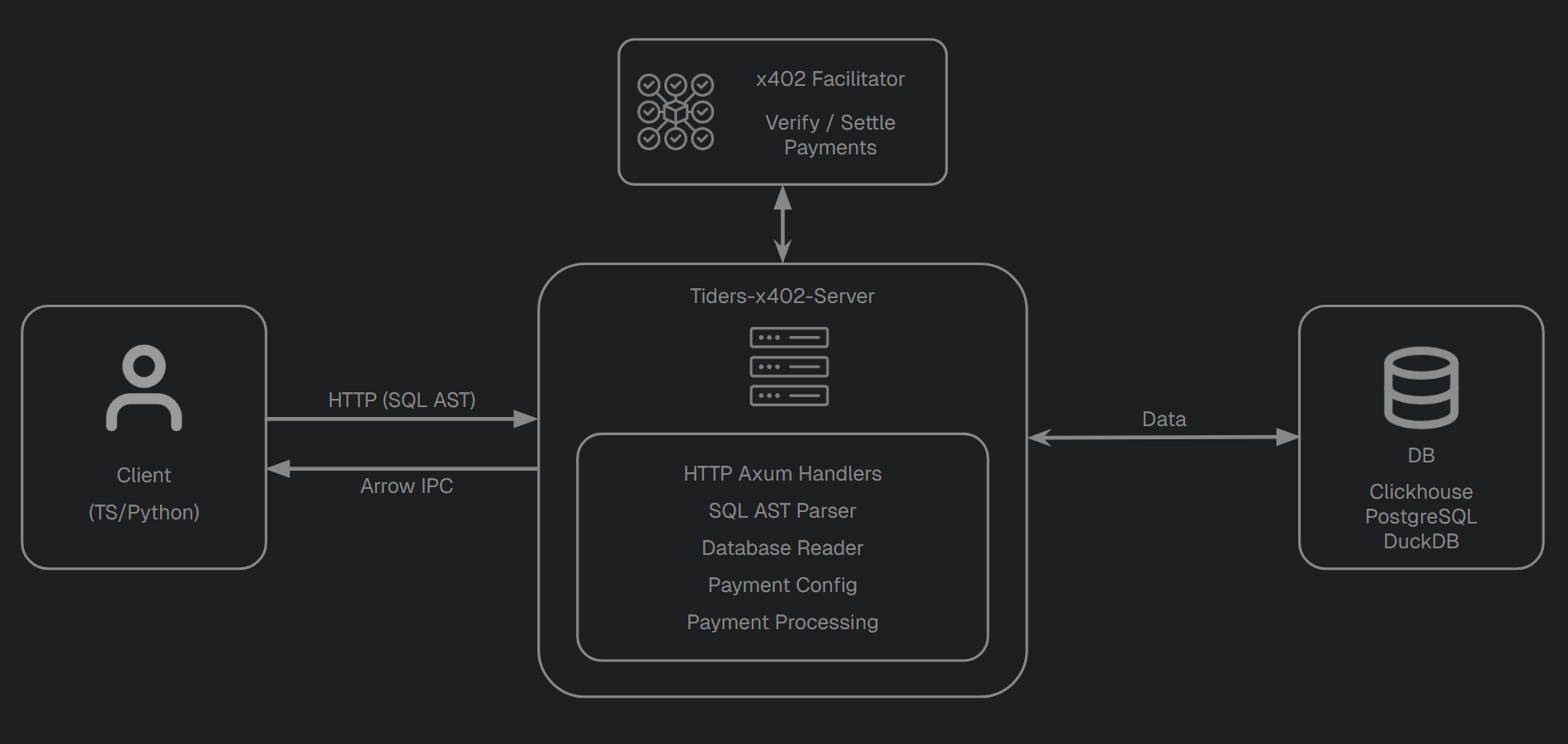
The server sits between clients and a database. Clients submit SQL queries over HTTP at /api/query. If a table requires payment, the server calculates the cost, returns an HTTP 402 with the payment options, and once the client resubmits with a signed payment, coordinates with an external x402 facilitator to verify and settle the payment before returning data as Arrow IPC.
The same binary also serves Evidence dashboards static pages at the endpoint /<slug>/, and a landing page with links to the multiple dashboards. The CLI can scaffold dashboards via tiders-x402-server dashboard <slug> which you can later edit at will.
You can run the server in two ways: via the CLI (YAML config, no code) or by embedding it as a library (Rust or Python).
Module Structure
The server is organized into the following modules under server/src/:
| Module | Purpose |
|---|---|
lib.rs | Server bootstrap: builds the Axum router, mounts API + dashboard routes, installs tracing/OTLP, handles graceful shutdown |
handler_api_root.rs | GET /api/ — JSON discovery document with server info, endpoints, and per-table summaries |
handler_api_query.rs | GET /api/query — main handler for query execution and the x402 payment flow |
handler_api_table_detail.rs | GET /api/table/{name} — table schema and payment offers |
cli/ | YAML config types (config.rs), YAML file loader and validation, env-var expansion and file watcher |
dashboard/ | Dashboard config (config.rs), Axum sub-router (routes.rs), scaffolder (scaffold.rs), embedded Evidence templates (templates.rs + templates/) |
database/ | Database trait + per-backend impls (db_duckdb.rs, db_postgresql.rs, db_clickhouse.rs), the simplified SQL parser (sql_parser.rs), and per-backend SQL read functions (sql_*.rs) |
payment/ | price.rs (PricingModel, PriceTag, TablePaymentOffers), config.rs (GlobalPaymentConfig, payment requirements), processing.rs (verify/settle orchestration), facilitator_client.rs (HTTP client for the facilitator) |
Request Lifecycle
For a paid query against GET /api/query:
- Axum receives the HTTP request, the routing layer matches
/api/*to the API sub-router; everything else falls through to the dashboard sub-router. sql_parserparses the SQL string and rejects unsafe constructs.- Per-backend
sql_*.rsconverts the analyzed query into backend-specific SQL. payment_configdetermines whether the table is free, paid, or unknown, and (for per-row pricing) computes pricing tiers based on an estimated row count.- If payment is required,
payment_processingandfacilitator_clienthandle verification and settlement with the remote facilitator. Fixed-price tables verify before executing; per-row tables execute first to compute the actual row count. - Database executes the query and serializes results into the Arrow IPC streaming format.
Hot Reload
When started via tiders-x402-server start (without --no-watch), a notify-backed watcher tracks the YAML config file. On change, the server re-parses the config and atomically swaps in a new GlobalPaymentConfig and dashboard router via arc-swap. Tables, pricing, facilitator settings.
Observability
The server emits structured logs via tracing and, when OTEL_EXPORTER_OTLP_ENDPOINT is set, exports OpenTelemetry spans over OTLP/gRPC. Each GET /api/query request gets its own api_query span; facilitator calls (/verify, /settle) are wrapped in their own spans with success/error status. The service name defaults to tiders-x402 and can be overridden with OTEL_SERVICE_NAME.
Payment Flow
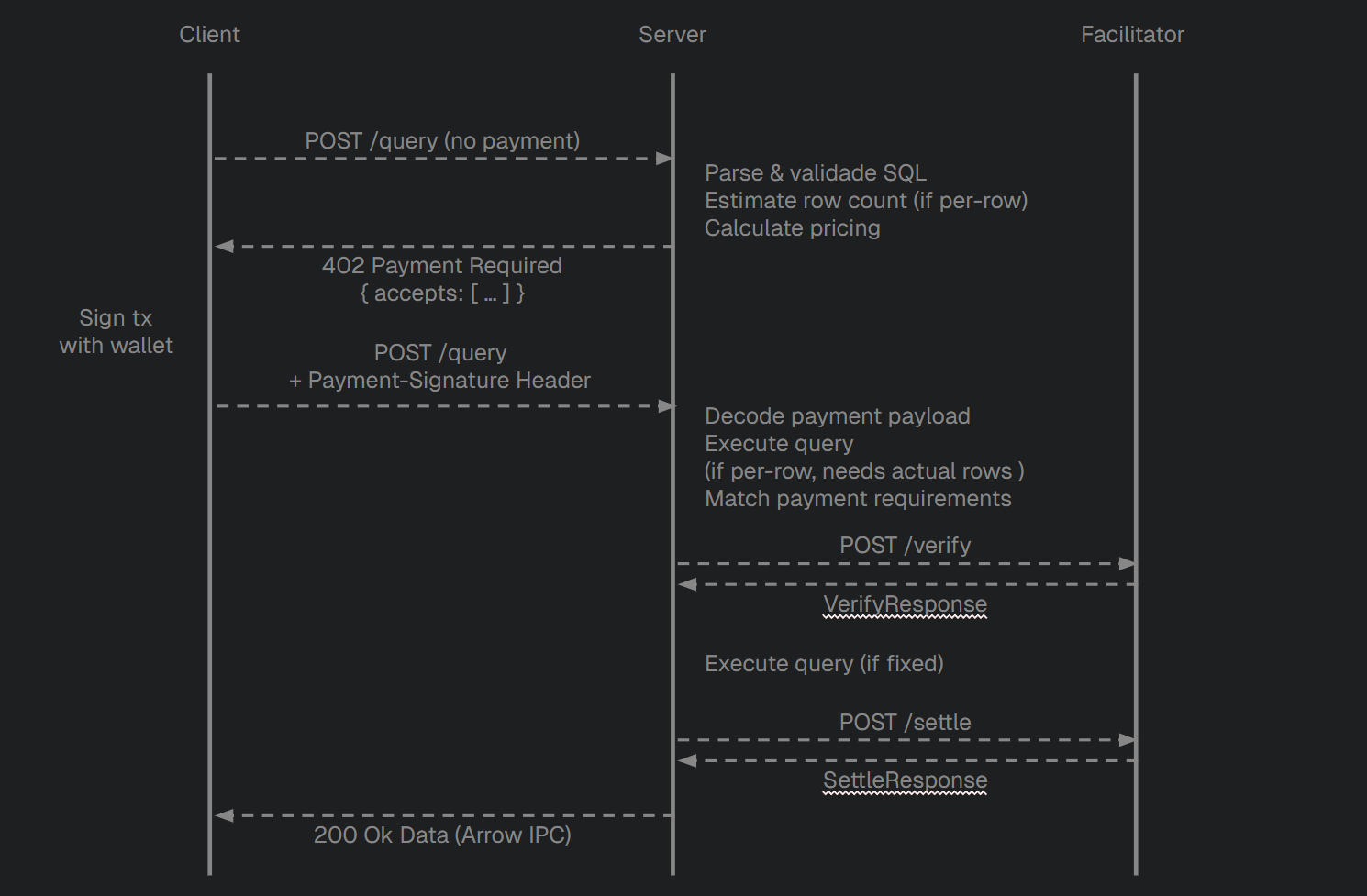
The server implements a two-step HTTP payment flow based on the x402 protocol (V2). The exact flow differs slightly depending on whether a table uses per-row, fixed, or metadata pricing. This document describes the flow from the server’s side.
Clients calling x402-gated APIs must also implement x402 logic to react to a 402 Payment Required response. Out-of-the-box client implementations are available in the official x402-foundation GitHub repository.
Pricing Flow
Step 1: Estimation
When a client sends a query to GET /api/query?query=… (or GET /api/table/{name} for metadata) without a Payment-Signature header:
- The server parses and validates the SQL.
- For per-row tables: it wraps the query in
SELECT COUNT(*) FROM (...)to estimate the row count, then computes the applicable pricing tiers. For fixed-price and metadata-price tables: this step is skipped (the price doesn’t depend on row count). - It returns HTTP 402 Payment Required with:
- A JSON body containing the error message,
resourceinfo, and all applicable payment options underaccepts. - A
Payment-Requiredheader carrying the same payload, base64-encoded (so SDKs that read headers, e.g.x402-fetch, can pick it up directly).
- A JSON body containing the error message,
{
  "x402Version": 2,
  "error": "No crypto payment found. Implement x402 protocol...",
  "resource": {
    "url": "http://server:4021/api/query?query=SELECT%20*%20FROM%20uniswap_v3_pool_swap%20LIMIT%202",
    "description": "Uniswap v3 swaps - 2 rows",
    "mimeType": "application/vnd.apache.arrow.stream"
  },
  "accepts": [
    {
      "scheme": "exact",
      "network": "eip155:84532",
      "amount": "4000",
      "payTo": "0xE7a820f9E05e4a456A7567B79e433cc64A058Ae7",
      "maxTimeoutSeconds": 300,
      "asset": "0x036CbD53842c5426634e7929541eC2318f3dCF7e",
      "extra": { "name": "USDC", "version": "2" }
    }
  ]
}
Each entry in accepts represents a valid payment option. If multiple pricing tiers apply (different tokens, networks, or bulk tiers), multiple options are returned and the client picks one.
Step 2: Execution and Settlement
The client resubmits the same request with a Payment-Signature header (base64-encoded PaymentPayload JSON). The server’s behaviour depends on the pricing model:
Per-Row Tables
- Decode and deserialize the payment payload into a V2
PaymentPayload. - Execute the actual query to get the real row count.
- Match the payload’s
acceptedfield against the generated payment requirements. - Send a verify request to the facilitator to confirm the payment is valid and funded.
- If verified, send a settle request to execute the on-chain transfer.
- Return the query results as Arrow IPC with HTTP 200.
Fixed-Price Tables
- Decode and deserialize the payment payload into a V2
PaymentPayload. - Match the payload’s
acceptedfield against the generated payment requirements (row count is irrelevant). - Send a verify request to the facilitator.
- Only after verification succeeds, execute the actual query.
- Send a settle request to execute the on-chain transfer.
- Return the query results as Arrow IPC with HTTP 200.
This ordering is intentional: it prevents an attacker from triggering expensive queries with bogus payment headers, since the database is never touched until the facilitator has approved the payment.
Metadata-Priced Tables (GET /api/table/{name})
The same verify-before-act flow as fixed-price tables. The “work” being protected is just serializing the table’s TablePaymentOffers to JSON, but the structure is identical: match → verify → return data → settle.
Error Cases
| Scenario | Response |
|---|---|
| Table not found | 400 Bad Request (/api/query) or 404 Not Found (/api/table/{name}) |
| Invalid SQL | 400 Bad Request |
| Malformed payment header | 400 Bad Request |
| No matching payment offer | 500 Internal Server Error |
| Payment verification fails | 402 Payment Required (with reason and updated options) |
| Payment settlement fails | 402 Payment Required (with reason and updated options) |
| Facilitator unreachable | 500 Internal Server Error |
CLI Overview
The tiders-x402-server CLI runs a payment-enabled database API server from a YAML configuration file. No Rust or Python code is needed – define your database, tables, pricing, and facilitator in YAML and the CLI handles the rest.
Commands
start
Starts the server.
tiders-x402-server start [CONFIG] [--no-watch]
| Argument | Description |
|---|---|
CONFIG | Path to the YAML config file. If omitted, auto-discovers a config in the current directory. |
--no-watch | Disable automatic config file watching (hot reload). |
--env-file PATH | Path to a .env file to load before reading the config. |
dashboard
Scaffolds an Evidence dashboard project from the server config. Run this once to create the project, then build it with npm install && npm run build.
tiders-x402-server dashboard [CONFIG] [SLUG] [--force] [--env-file PATH]
| Argument | Description |
|---|---|
CONFIG | Path to the YAML config file. If omitted, auto-discovers a config in the current directory. |
SLUG | Dashboard slug to scaffold. If omitted, scaffolds every dashboard in dashboards.entries. |
--force | Overwrite managed files (templates, components, connection.yaml) in an existing project. User-owned files (pages/*.md, sources/**/*.sql) are always preserved. |
--env-file PATH | Path to a .env file to load before reading the config. |
The scaffolded project is written to {dashboards_root}/{slug}/ (default: ./dashboards/{slug}/). After scaffolding:
cd dashboards/my-dashboard
npm install && npm run build
Then start the server — it serves the built site at /{slug}/.
validate
Validates the config file and tests database connectivity, then exits. Useful for CI or pre-deploy checks.
tiders-x402-server validate [CONFIG]
| Argument | Description |
|---|---|
CONFIG | Path to the YAML config file. If omitted, auto-discovers a config in the current directory. |
On success, prints the number of registered tables and confirms the database is reachable. On failure, prints a descriptive error and exits with a non-zero code.
Environment Variables
YAML values can reference environment variables using ${VAR_NAME} syntax. Variables are expanded before the YAML is parsed.
database:
  clickhouse:
    url: "http://${CLICKHOUSE_HOST}:${CLICKHOUSE_PORT}"
    user: "${CLICKHOUSE_USER}"
    password: "${CLICKHOUSE_PASSWORD}"
The CLI automatically loads a .env file from the same directory as the config file before substitution. Use –env-file to point to a different location:
tiders-x402-server start --env-file /path/to/.env
If a referenced variable is not set, the CLI exits with an error listing all missing variables.
See examples/cli/.env.example for a template.
Hot Reload
By default, the CLI watches the config file for changes. When a modification is detected, it reloads:
- Tables – added, removed, or modified table definitions and pricing tiers
- Payment settings –
max_timeout_seconds,default_description - Facilitator – URL, timeout, and headers
The database connection is not reloaded – changing the database backend requires a restart.
Hot reload is enabled by default. Disable it with --no-watch:
tiders-x402-server start --no-watch
Logging
The CLI uses tracing for structured logging. Control the log level with the RUST_LOG environment variable:
# Default level is info
RUST_LOG=info tiders-x402-server start

# Debug logging
RUST_LOG=debug tiders-x402-server start

# Quiet (errors only)
RUST_LOG=error tiders-x402-server start
OpenTelemetry tracing is also supported. See Observability for details.
YAML Configuration Reference
Complete reference for the tiders-x402-server CLI configuration file. The config uses five top-level sections: server, facilitator, database, payment, and tables.
Unknown fields are rejected – the CLI will report an error if a key is misspelled or unsupported.
Server
Required. Network configuration for the HTTP server.
| Field | Type | Required | Description |
|---|---|---|---|
bind_address | string | yes | Address and port to bind (e.g., "0.0.0.0:4021") |
base_url | string | yes | Public URL of the server, used in x402 payment responses (e.g., "https://api.example.com") |
server:
  bind_address: "0.0.0.0:4021"
  base_url: "http://localhost:4021"
Facilitator
Required. Configuration for the x402 facilitator service that handles payment verification and settlement.
| Field | Type | Required | Description |
|---|---|---|---|
url | string | yes | Facilitator endpoint (e.g., "https://facilitator.x402.rs") |
timeout | integer | no | Request timeout in seconds |
headers | map | no | Custom HTTP headers sent with every facilitator request |
cdp_auth | map | no | Coinbase Developer Platform JWT auth (see below) |
facilitator:
  url: "https://facilitator.x402.rs"
  timeout: 30
  headers:
    X-Custom-Header: "value"
Static bearer token / custom header
Some facilitators (e.g. OpenZeppelin’s relayer plugin) authenticate with a
static Authorization: Bearer <token>. Use the headers: block:
facilitator:
  url: "https://relayer.example/x402"
  headers:
    Authorization: "Bearer ${RELAYER_API_KEY}"
Coinbase Developer Platform (CDP) JWT auth
The CDP facilitator at https://api.cdp.coinbase.com/platform/v2/x402 does not
accept static bearer tokens. It requires a fresh Ed25519-signed JWT on every
request, bound to the request URI. Configure it with the cdp_auth block:
| Field | Type | Required | Description |
|---|---|---|---|
key_id | string | yes | CDP API key ID (UUID), as shown in the CDP portal |
key_secret | string | yes | CDP Ed25519 secret API key, standard base64 of the 64-byte seed || public_key blob |
facilitator:
  url: "https://api.cdp.coinbase.com/platform/v2/x402"
  cdp_auth:
    key_id: "${CDP_API_KEY_ID}"
    key_secret: "${CDP_API_KEY_SECRET}"
The server mints a short-lived (2-minute) JWT per /verify and /settle call
and attaches it as Authorization: Bearer <jwt>. cdp_auth can coexist with
the headers: block — any custom headers are sent alongside the bearer
header.
Database
Required. Database backend configuration. Exactly one backend must be specified.
DuckDb
| Field | Type | Required | Description |
|---|---|---|---|
path | string | yes | Path to the DuckDB database file |
database:
  duckdb:
    path: "./data/my_data.duckdb"
PostgreSQL
| Field | Type | Required | Description |
|---|---|---|---|
connection_string | string | yes | PostgreSQL connection string |
database:
  postgresql:
    connection_string: "host=${PG_HOST} port=5432 user=${PG_USER} password=${PG_PASSWORD} dbname=tiders"
Clickhouse
| Field | Type | Required | Description |
|---|---|---|---|
url | string | yes | ClickHouse HTTP endpoint |
user | string | no | Database user |
password | string | no | Database password |
database | string | no | Database name |
access_token | string | no | Access token for authentication |
compression | string | no | Compression mode: "none" or "lz4" |
database:
  clickhouse:
    url: "http://${CLICKHOUSE_HOST}:${CLICKHOUSE_PORT}"
    user: "${CLICKHOUSE_USER}"
    password: "${CLICKHOUSE_PASSWORD}"
    database: "${CLICKHOUSE_DB}"
    compression: "lz4"
Payment
Optional. Global payment settings. All fields have defaults.
| Field | Type | Default | Description |
|---|---|---|---|
max_timeout_seconds | integer | 300 | How long a payment offer remains valid (seconds) |
default_description | string | "Query execution payment" | Fallback description for tables without their own |
payment:
  max_timeout_seconds: 300
  default_description: "Query execution payment"
Tables
Optional. List of tables exposed by the server. Each table is auto-discovered from the database; the config defines pricing and descriptions.
| Field | Type | Required | Description |
|---|---|---|---|
name | string | yes | Table name in the database |
description | string | no | Human-readable description |
price_tags | list | no | Pricing tiers. Empty or absent means the table is free |
tables:
  - name: my_table
    description: "My dataset"
    price_tags:
      - type: per_row
        pay_to: "0xYourAddress"
        token: usdc/base_sepolia
        amount_per_item: "0.002"
        is_default: true
Price Tag Types
Price tags use a type field to select the pricing model. Three types are supported:
Per Row
Price scales linearly with the number of rows returned. Supports tiered pricing via min_items / max_items.
| Field | Type | Required | Description |
|---|---|---|---|
pay_to | string | yes | Recipient wallet address |
token | string | yes | Token identifier (see below) |
amount_per_item | string | yes | Price per row as a human-readable decimal (e.g., "0.002") |
min_items | integer | no | Minimum row count for this tier to apply |
max_items | integer | no | Maximum row count for this tier to apply |
min_total_amount | string | no | Minimum total charge, even if per-row calculation is lower |
description | string | no | Label for this tier |
is_default | boolean | no | Whether this is the default tier (default: false) |
# Default tier: $0.002 per row
- type: per_row
  pay_to: "0xYourAddress"
  token: usdc/base_sepolia
  amount_per_item: "0.002"
  is_default: true

# Bulk tier: $0.001 per row for 100+ rows
- type: per_row
  pay_to: "0xYourAddress"
  token: usdc/base_sepolia
  amount_per_item: "0.001"
  min_items: 100
Fixed
A flat fee regardless of how many rows are returned.
| Field | Type | Required | Description |
|---|---|---|---|
pay_to | string | yes | Recipient wallet address |
token | string | yes | Token identifier (see below) |
amount | string | yes | Fixed amount as a human-readable decimal (e.g., "1.00") |
description | string | no | Label for this tier |
is_default | boolean | no | Whether this is the default tier (default: false) |
- type: fixed
  pay_to: "0xYourAddress"
  token: usdc/base_sepolia
  amount: "1.00"
  description: "Fixed price query"
Metadata Price
A flat fee for accessing table metadata (schema and payment offers) via the GET /api/table/{name} endpoint. Without this tag, metadata is returned freely. Charging for the metadata API calls can be used to prevent API abuse.
| Field | Type | Required | Description |
|---|---|---|---|
pay_to | string | yes | Recipient wallet address |
token | string | yes | Token identifier (see below) |
amount | string | yes | Fixed amount as a human-readable decimal (e.g., "0.01") |
description | string | no | Label for this tier |
is_default | boolean | no | Whether this is the default tier (default: false) |
- type: metadata_price
  pay_to: "0xYourAddress"
  token: usdc/base_sepolia
  amount: "1.00"
  description: "Metadata access fee"
Token Identifiers
Token identifiers use the format token_name/network. Supported tokens:
| Identifier | Token | Network |
|---|---|---|
usdc/base_sepolia | USDC | Base Sepolia (testnet) |
usdc/base | USDC | Base |
usdc/avalanche_fuji | USDC | Avalanche Fuji (testnet) |
usdc/avalanche | USDC | Avalanche |
usdc/polygon | USDC | Polygon |
usdc/polygon_amoy | USDC | Polygon Amoy (testnet) |
See also examples/cli/ for a ready-to-use config and .env.example.
Dashboards
Optional. Configures Evidence dashboards served by the server. Each entry is served as a static site at /<slug>/. Use tiders-x402-server dashboard <slug> to scaffold the Evidence project on disk.
Top-level fields
| Field | Type | Default | Description |
|---|---|---|---|
root | string | ./dashboards/ | Root directory where dashboard project folders are scaffolded (resolved relative to the config file) |
entries | list | [] | List of dashboard definitions |
dashboards:
  root: "./dashboards"   # optional
  entries:
    - slug: my-dashboard
      title: "My Dashboard"
      description: "A short description shown on the landing page."
      tags: ["DeFi", "Ethereum"]
Entry fields
| Field | Type | Required | Description |
|---|---|---|---|
slug | string | yes | URL-safe identifier; becomes the route prefix /<slug>/. Must match ^[a-z0-9][a-z0-9_-]*$. Reserved: api, assets, static |
title | string | yes | Human-readable name shown on the landing page |
description | string | no | One-line description shown under the title on the landing page card |
tags | list | no | Labels rendered as pills on the landing page card (e.g., ["DeFi", "Ethereum"]) |
disabled | boolean | no | Set to true to exclude this dashboard from the server without removing the entry (default: false) |
folder_path | string | no | Path where the Evidence project will be scaffolded. Defaults to <root>/<slug>/. Resolved relative to the config file |
build_path | string | no | Path to the built static site served at runtime. Defaults to <folder_path>/build. Resolved relative to the config file |
dashboards:
  entries:
    - slug: uniswap_v3
      title: "Uniswap V3"
      description: "Pool swaps and liquidity events on Uniswap V3."
      tags: ["Dex", "DeFi", "Ethereum"]
      # disabled: true
      # folder_path: "./dashboards/uniswap_v3"
      # build_path: "./dashboards/uniswap_v3/build"
Scaffolding and serving
Scaffold a dashboard project with:
tiders-x402-server dashboard uniswap_v3        # scaffold one dashboard
tiders-x402-server dashboard                    # scaffold all dashboards
tiders-x402-server dashboard uniswap_v3 --force # overwrite managed files
After scaffolding, build the Evidence project:
cd dashboards/uniswap_v3 && npm install && npm run build
Then start the server — the built site is served automatically at /<slug>/.
Building a Server with the SDK
When using tiders-x402-server as a library, you construct and start the server from your own code. This gives you full control over database setup, pricing logic, and server lifecycle.
Both Rust and Python examples are shown side by side. They follow the same steps and produce identical servers. For the full range of configuration options see the Configuration Reference.
Prefer zero-code setup? Use the CLI instead — define everything in a YAML config file and run
tiders-x402-server start
1. Connect to a Facilitator
The facilitator handles blockchain-side payment operations (verification and settlement). Point it at a public facilitator or a running facilitator instance.
Rust:
#![allow(unused)]
fn main() {
use tiders_x402_server::FacilitatorClient;

let facilitator = FacilitatorClient::try_from("https://facilitator.x402.rs")
    .expect("Failed to create facilitator client");
}
Python:
import tiders_x402_server

facilitator = tiders_x402_server.FacilitatorClient("https://facilitator.x402.rs")
2. Create a Database
Create a database backend.
The examples in the repo ship with a sample CSV file (uniswap_v3_pool_swap.csv) containing Uniswap V3 swap data. For DuckDB, you can load it directly. For PostgreSQL and ClickHouse, seed scripts are provided.
DuckDB
Rust:
#![allow(unused)]
fn main() {
let conn = duckdb::Connection::open_in_memory().expect("Failed to open DuckDB");
conn.execute_batch(
    "CREATE TABLE uniswap_v3_pool_swap AS \
     SELECT * FROM read_csv_auto('../uniswap_v3_pool_swap.csv');"
).expect("Failed to load sample data");
let db = tiders_x402_server::database::db_duckdb::DuckDbDatabase::new(conn);
}
Python:
import duckdb
db_path = "data/duckdb.db"
db = tiders_x402_server.DuckDbDatabase(db_path)
See examples/rust/src/main.rs and examples/seed_postgresql.sql / examples/seed_clickhouse.sql for the PostgreSQL and ClickHouse construction patterns.
3. Define Price Tags
A PriceTag describes a single pricing tier: who gets paid, how much, in which token, and under which pricing model. Tables can have multiple price tags for tiered pricing — clients receive all applicable options in the 402 response.
Three pricing models are supported: per-row, fixed, and metadata price. Amounts accept human-readable decimal strings (e.g., "0.002").
Per Row
Price scales linearly with the number of rows returned. Supports tiered pricing via min_items / max_items.
Rust:
#![allow(unused)]
fn main() {
use std::str::FromStr;
use x402_chain_eip155::chain::ChecksummedAddress;
use x402_types::networks::USDC;
use tiders_x402_server::{PriceTag, PricingModel};
use tiders_x402_server::payment::price::TokenAmount;

let usdc = USDC::base_sepolia();

// Default tier: $0.002 per row
let default_tag = PriceTag {
    pay_to: ChecksummedAddress::from_str("0x[your_address]").unwrap(),
    pricing: PricingModel::PerRow {
        amount_per_item: TokenAmount(usdc.parse("0.002").unwrap().amount),
        min_total_amount: None,
        min_items: None,
        max_items: None,
    },
    token: usdc.clone(),
    description: None,
    is_default: true,
};

// Bulk tier: $0.001 per row for 100+ rows
let bulk_tag = PriceTag {
    pay_to: ChecksummedAddress::from_str("0x[your_address]").unwrap(),
    pricing: PricingModel::PerRow {
        amount_per_item: TokenAmount(usdc.parse("0.001").unwrap().amount),
        min_total_amount: None,
        min_items: Some(100),
        max_items: None,
    },
    token: usdc.clone(),
    description: None,
    is_default: false,
};
}
Python:
usdc = tiders_x402_server.USDC("base_sepolia")

default_tag = tiders_x402_server.PriceTag(
    pay_to="0x[your_address]",
    amount_per_item="0.002",
    token=usdc,
    is_default=True,
)

bulk_tag = tiders_x402_server.PriceTag(
    pay_to="0x[your_address]",
    amount_per_item="0.001",
    token=usdc,
    min_items=100,
)
Fixed
A flat fee regardless of how many rows are returned.
Rust:
#![allow(unused)]
fn main() {
let fixed_tag = PriceTag {
    pay_to: ChecksummedAddress::from_str("0x[your_address]").unwrap(),
    pricing: PricingModel::Fixed {
        amount: TokenAmount(usdc.parse("1.00").unwrap().amount),
    },
    token: usdc.clone(),
    description: Some("Fixed price query".to_string()),
    is_default: false,
};
}
Python:
fixed_tag = tiders_x402_server.PriceTag.fixed(
    pay_to="0x[your_address]",
    fixed_amount="1.00",
    token=usdc,
    description="Fixed price query",
)
Metadata Price
A flat fee for accessing table metadata (schema and payment offers) via GET /api/table/{name}. Without this tag, metadata is returned freely. Charging for metadata is useful to deter scraping or fund schema-discovery costs.
Rust:
#![allow(unused)]
fn main() {
let metadata_tag = PriceTag {
    pay_to: ChecksummedAddress::from_str("0x[your_address]").unwrap(),
    pricing: PricingModel::MetadataPrice {
        amount: TokenAmount(usdc.parse("1.00").unwrap().amount),
    },
    token: usdc.clone(),
    description: Some("Metadata access fee".to_string()),
    is_default: false,
};
}
Python:
metadata_tag = tiders_x402_server.PriceTag.metadata_price(
    pay_to="0x[your_address]",
    amount="1.00",
    token=usdc,
    description="Metadata access fee",
)
4. Build Table Payment Offers
A TablePaymentOffers groups the price tags for a single table along with its description and schema. The schema is optional but recommended — it is shown to clients in the discovery document.
Rust:
#![allow(unused)]
fn main() {
use tiders_x402_server::{TablePaymentOffers, Database};

let schema = db.get_table_schema("uniswap_v3_pool_swap")
    .await
    .expect("Failed to get table schema");

let offers_table = TablePaymentOffers::new(
    "uniswap_v3_pool_swap".to_string(),
    vec![default_tag, bulk_tag, fixed_tag],
    Some(schema),
)
.with_description("Uniswap V3 swaps".to_string());
}
Python:
schema = db.get_table_schema("uniswap_v3_pool_swap")

offers_table = tiders_x402_server.TablePaymentOffers(
    "uniswap_v3_pool_swap",
    [default_tag, bulk_tag, fixed_tag],
    schema=schema,
    description="Uniswap V3 swaps",
)
For free tables that require no payment, use TablePaymentOffers::new_free_table (Rust) or TablePaymentOffers.new_free_table (Python). See the Configuration Reference for all available methods.
5. Build the Payment Configuration
The global payment configuration holds the facilitator client and all table offers.
Rust:
#![allow(unused)]
fn main() {
use tiders_x402_server::GlobalPaymentConfig;

let mut global_payment_config = GlobalPaymentConfig::default(facilitator);
global_payment_config.add_offers_table(offers_table);
}
Python:
global_payment_config = tiders_x402_server.GlobalPaymentConfig(facilitator)
global_payment_config.add_offers_table(offers_table)
6. Create State and Start the Server
Wrap the database, payment configuration, and dashboards state into the application state, then start the server.
AppState::new takes a DashboardsState even when you don’t want any dashboards — pass an empty one. The CLI’s auto-built AppState does the same when dashboards: is missing from the YAML.
Rust:
#![allow(unused)]
fn main() {
use std::path::PathBuf;
use url::Url;
use tiders_x402_server::{AppState, start_server};
use tiders_x402_server::dashboard::DashboardsState;

let server_base_url = Url::parse("http://localhost:4021").expect("Failed to parse base URL");
let server_bind_address = "0.0.0.0:4021".to_string();

let dashboards_state = DashboardsState {
    root: PathBuf::new(),
    dashboards: vec![],
};

let state = AppState::new(
    db,
    global_payment_config,
    server_base_url,
    server_bind_address,
    dashboards_state,
);

start_server(state).await;
}
Python:
state = tiders_x402_server.AppState(
    db,
    global_payment_config,
    "http://localhost:4021",
    "0.0.0.0:4021",
)

tiders_x402_server.start_server(state)
The server blocks until it receives a shutdown signal (Ctrl+C or SIGTERM).
Verifying the Server
Once running, hit the discovery endpoint:
curl http://localhost:4021/api/
This returns a JSON document listing every table, its pricing tiers, and the available endpoints. Use one of the client scripts to actually run a paid query end-to-end.
Environment Variables
The server loads .env files via dotenvy. OpenTelemetry tracing is opt-in — set these variables to export traces:
OTEL_EXPORTER_OTLP_ENDPOINT=http://localhost:4317
OTEL_SERVICE_NAME=tiders-x402-server
Configuration Reference
This page covers programmatic configuration via the Rust and Python SDKs. All configuration objects provide both Rust functions and Python bindings.
AppState
The shared application state accessible by every request handler. Holds the database connection, payment configuration, server URL, bind address, and dashboards state.
| Field | Type | Description |
|---|---|---|
db | Arc<dyn Database> | Database backend (DuckDB, Postgres, ClickHouse) |
payment_config | Arc<RwLock<Arc<GlobalPaymentConfig>>> | Global payment configuration (wrapped in RwLock to support hot-reload) |
server_base_url | Url | Server’s public URL, used for building resource URLs in payment requirements (e.g. https://api.tiders.com) |
server_bind_address | String | Address and port the server binds to (e.g. 0.0.0.0:4021) |
dashboards | Arc<ArcSwap<DashboardsState>> | Configured dashboards (root path + per-slug entries). Lock-free swappable so the file watcher can update them without restarting |
dashboard_router | Arc<ArcSwap<Router>> | The currently mounted Axum sub-router for /<slug>/.... Atomically replaced when dashboards: changes |
AppState::new takes a DashboardsState. Pass an empty one if you don’t want dashboards — the API endpoints work the same either way.
Construction
#![allow(unused)]
fn main() {
// Rust
use std::path::PathBuf;
use tiders_x402_server::dashboard::DashboardsState;

let dashboards_state = DashboardsState {
    root: PathBuf::new(),
    dashboards: vec![],
};

let state = AppState::new(
    db,
    payment_config,
    Url::parse("https://api.tiders.com").unwrap(),
    "0.0.0.0:4021".to_string(),
    dashboards_state,
);
}
# Python — dashboards configuration via SDK is not yet exposed; use the CLI for that.
state = AppState(database, payment_config, "https://api.tiders.com", "0.0.0.0:4021")
FacilitatorClient
HTTP client for communicating with a remote x402 facilitator. Wraps a base URL and derives /verify, /settle, and /supported endpoints automatically.
Construction
#![allow(unused)]
fn main() {
// Rust
let facilitator = FacilitatorClient::try_from("https://facilitator.x402.rs")
    .expect("Failed to create facilitator client");
}
# Python
facilitator = FacilitatorClient("https://facilitator.x402.rs")
Getters
| Getter | Rust | Python | Returns |
|---|---|---|---|
| Base URL | facilitator.base_url() | facilitator.base_url | &Url / str |
| Verify URL | facilitator.verify_url() | facilitator.verify_url | &Url / str |
| Settle URL | facilitator.settle_url() | facilitator.settle_url | &Url / str |
| Headers | facilitator.headers() | – | &HeaderMap |
| Timeout | facilitator.timeout() | facilitator.timeout_ms | &Option<Duration> / Optional[int] (ms) |
Setters
| Setter | Rust | Python |
|---|---|---|
| Set custom headers | facilitator.with_headers(header_map) | facilitator.set_headers({"Authorization": "Bearer ..."}) |
| Set timeout | facilitator.with_timeout(Duration::from_millis(5000)) | facilitator.set_timeout(5000) |
| Attach CDP JWT signer | facilitator.with_cdp_signer(Arc::new(signer)) | – (not exposed to Python yet) |
Authentication
Most public facilitators (e.g. https://facilitator.x402.rs) need no auth. For
those that do:
-
Static bearer / API-key header — set it via
with_headers(...). The header is sent verbatim on every request. -
CDP JWT — the Coinbase Developer Platform facilitator requires a fresh Ed25519 JWT bound to each request URI. Construct a
CdpJwtSignerand attach it withwith_cdp_signer(...):#![allow(unused)] fn main() { use std::sync::Arc; use tiders_x402_server::payment::cdp_jwt::CdpJwtSigner; let signer = CdpJwtSigner::try_new( std::env::var("CDP_API_KEY_ID")?, &std::env::var("CDP_API_KEY_SECRET")?, )?; let facilitator = FacilitatorClient::try_from( "https://api.cdp.coinbase.com/platform/v2/x402", )? .with_cdp_signer(Arc::new(signer)); }The signer holds the decoded Ed25519 key once and produces a per-request JWT (2-minute expiry,
iss: "cdp",uris: ["<METHOD> <host><path>"]claim). Seepayment::cdp_jwtfor the full type and error enum.
GlobalPaymentConfig
Central payment configuration shared across all request handlers. Holds the facilitator client, response format, timeout, and per-table pricing rules.
| Field | Type | Default | Description |
|---|---|---|---|
facilitator | Arc<FacilitatorClient> | – | Client for the x402 facilitator service |
mime_type | String | application/vnd.apache.arrow.stream | Response MIME type |
max_timeout_seconds | u64 | 300 | How long a payment offer remains valid |
default_description | String | Query execution payment | Fallback description for tables without their own |
offers_tables | HashMap<String, TablePaymentOffers> | empty | Per-table payment configuration |
Construction
All fields except facilitator are optional and fall back to sensible defaults.
#![allow(unused)]
fn main() {
// Rust - with defaults
let config = GlobalPaymentConfig::default(facilitator);

// Rust - with custom values
let config = GlobalPaymentConfig::new(
    facilitator,
    Some("text/csv".to_string()),       // mime_type
    Some(600),                           // max_timeout_seconds
    Some("Custom description".to_string()), // default_description
    None,                                // offers_tables (defaults to empty)
);
}
# Python - with defaults
config = GlobalPaymentConfig(facilitator)
# Python - with custom values
config = GlobalPaymentConfig(
facilitator,
mime_type="text/csv",
max_timeout_seconds=600,
default_description="Custom description",
)
Getters
| Getter | Rust | Python | Returns |
|---|---|---|---|
| MIME type | config.mime_type (pub field) | config.mime_type | String / str |
| Max timeout | config.max_timeout_seconds (pub field) | config.max_timeout_seconds | u64 / int |
| Default description | config.default_description (pub field) | config.default_description | String / str |
| Get table offers | config.get_offers_table("table") | – | Option<&TablePaymentOffers> |
| Table requires payment | config.table_requires_payment("table") | config.table_requires_payment("table") | Option<bool> |
Setters
| Setter | Rust | Python |
|---|---|---|
| Set facilitator | config.set_facilitator(facilitator) | config.set_facilitator(facilitator) |
| Set MIME type | config.set_mime_type("text/csv".to_string()) | config.set_mime_type("text/csv") |
| Set max timeout | config.set_max_timeout_seconds(600) | config.set_max_timeout_seconds(600) |
| Set default description | config.set_default_description("...".to_string()) | config.set_default_description("...") |
| Add table offers | config.add_offers_table(offer) | config.add_offers_table(offer) |
PriceTag
A single pricing tier for a table. Defines who gets paid, how much, and in which token. A table can have multiple price tags for tiered pricing. The pricing model (per-row, fixed, or metadata price) is specified via the pricing field.
| Field | Type | Description |
|---|---|---|
pay_to | ChecksummedAddress | Recipient wallet address |
pricing | PricingModel | Per-row or fixed pricing (see below) |
token | Eip155TokenDeployment | ERC-20 token (chain, contract address, transfer method) |
description | Option<String> | Human-readable label for this tier |
is_default | bool | Whether this is the default pricing tier |
PricingModel
| Variant | Fields | Description |
|---|---|---|
PerRow | amount_per_item, min_items, max_items, min_total_amount | Price scales with row count |
Fixed | amount | Flat fee regardless of row count |
MetadataPrice | amount | Flat fee for accessing table metadata via GET /api/table/{name} |
Construction (Per-Row)
#![allow(unused)]
fn main() {
// Rust
let price_tag = PriceTag {
    pay_to: ChecksummedAddress::from_str("0x...").unwrap(),
    pricing: PricingModel::PerRow {
        amount_per_item: TokenAmount(usdc.parse("0.002").unwrap().amount),
        min_total_amount: None,
        min_items: None,
        max_items: None,
    },
    token: usdc.clone(),
    description: None,
    is_default: true,
};
}
# Python — per-row pricing (constructor)
# amount_per_item accepts a string ("0.002") or int (2000) for smallest token units
price_tag = PriceTag(
pay_to="0x...",
amount_per_item="0.002",
token=usdc,
is_default=True,
)
Construction (Fixed)
#![allow(unused)]
fn main() {
// Rust
let price_tag = PriceTag {
    pay_to: ChecksummedAddress::from_str("0x...").unwrap(),
    pricing: PricingModel::Fixed {
        amount: TokenAmount(usdc.parse("1.00").unwrap().amount),
    },
    token: usdc.clone(),
    description: Some("Fixed price query".to_string()),
    is_default: true,
};
}
# Python — fixed pricing (static method)
price_tag = PriceTag.fixed(
pay_to="0x...",
fixed_amount="1.00",
token=usdc,
description="Fixed price query",
is_default=True,
)
Construction (Metadata Price)
#![allow(unused)]
fn main() {
// Rust
let price_tag = PriceTag {
    pay_to: ChecksummedAddress::from_str("0x...").unwrap(),
    pricing: PricingModel::MetadataPrice {
        amount: TokenAmount(usdc.parse("1.00").unwrap().amount),
    },
    token: usdc.clone(),
    description: Some("Metadata access fee".to_string()),
    is_default: false,
};
}
# Python — metadata pricing (static method)
price_tag = PriceTag.metadata_price(
pay_to="0x...",
amount="1.00",
token=usdc,
description="Metadata access fee",
)
PriceTag is immutable after creation – create a new one to change values.
TablePaymentOffers
Groups the payment configuration for a single table: its pricing tiers, whether payment is required, and metadata shown to clients.
| Field | Type | Description |
|---|---|---|
table_name | String | The table this configuration applies to |
price_tags | Vec<PriceTag> | Available pricing tiers |
requires_payment | bool | Whether queries require payment (derived from price tags) |
description | Option<String> | Description shown in root endpoint and 402 responses |
schema | Option<Schema> | Arrow schema for client discovery |
Construction
#![allow(unused)]
fn main() {
// Rust - paid table
let offer = TablePaymentOffers::new("my_table".to_string(), vec![price_tag], Some(schema))
    .with_description("My dataset".to_string());

// Rust - free table
let free = TablePaymentOffers::new_free_table("public_table".to_string(), Some(schema));
}
# Python - paid table (description can be set at creation)
offer = TablePaymentOffers("my_table", [price_tag], schema=schema, description="My dataset")
# Python - free table
free = TablePaymentOffers.new_free_table("public_table", schema=schema, description="Public data")
Getters
| Getter | Rust | Python | Returns |
|---|---|---|---|
| Table name | offer.table_name (pub field) | offer.table_name | String / str |
| Requires payment | offer.requires_payment (pub field) | offer.requires_payment | bool |
| Description | offer.description (pub field) | offer.description | Option<String> / Optional[str] |
| Price tag count | offer.price_tags.len() (pub field) | offer.price_tag_count | usize / int |
| Price tag descriptions | iterate offer.price_tags | offer.price_tag_descriptions | – / List[Optional[str]] |
Setters / Mutators
| Method | Rust | Python | Description |
|---|---|---|---|
| Set description | .with_description(desc) | .with_description(desc) | Set or replace the description |
| Add price tag | .add_payment_offer(tag) | .add_payment_offer(tag) | Add a pricing tier, sets requires_payment = true |
| Remove price tag | .remove_price_tag(index) | .remove_price_tag(index) | Remove by index, returns bool, updates requires_payment |
| Make free | .make_free() | .make_free() | Remove all price tags and set requires_payment = false |
Tiered Pricing Example
Charge less per row for larger queries (per-row pricing):
#![allow(unused)]
fn main() {
// Default: $0.002/row for any query
let default_tier = PriceTag {...}

// Bulk: $0.001/row for queries returning 100+ rows
let bulk_tier = PriceTag {...}

let offer = TablePaymentOffers::new("my_table".to_string(), vec![default_tier], Some(schema))
    .add_payment_offer(bulk_tier);
}
The client receives both options in the 402 response and can choose the cheaper one.
Supported Networks
Currently supported USDC deployments:
| Network | Rust | Python |
|---|---|---|
| Base Sepolia (testnet) | USDC::base_sepolia() | USDC("base_sepolia") |
| Base | USDC::base() | USDC("base") |
| Avalanche Fuji (testnet) | USDC::avalanche_fuji() | USDC("avalanche_fuji") |
| Avalanche | USDC::avalanche() | USDC("avalanche") |
| Polygon | USDC::polygon() | USDC("polygon") |
| Polygon Amoy (testnet) | USDC::polygon_amoy() | USDC("polygon_amoy") |
API Endpoints
The server exposes the following HTTP endpoints:
| Method | Path | Purpose |
|---|---|---|
GET | / | Dashboard landing page (HTML), only mounted when dashboards: is configured |
GET | /{slug}/... | Static files for an Evidence dashboard (one route per dashboards: entry) |
GET | /api/ | JSON discovery document — server info, endpoints, table summaries |
GET | /api/query?query=… | Submit a SQL query (paywalled per the table’s price tags) |
GET | /api/table/{name} | Full schema and pricing for a single table; optionally paywalled via MetadataPrice |
All paid endpoints follow the x402 V2 protocol. The Payment-Signature header carries the base64-encoded PaymentPayload; the server replies with a Payment-Required header on 402 alongside a JSON body.
GET /
When dashboards are configured, the root path serves an HTML landing page listing every enabled dashboard with its title, description, and tags. The page is generated by tiders-x402-server dashboard … into <dashboards_root>/index.html and re-served verbatim. If dashboards_root/index.html is missing, the server returns 503 with a hint to run the dashboard subcommand.
When no dashboards are configured, / is unmounted and falls through to a 404 from the (empty) dashboard sub-router.
GET /api/
Returns a JSON discovery document — the canonical machine-readable description of the server.
Request
curl http://localhost:4021/api/
Response (200 OK, application/json)
{
  "server": {
    "url": "http://localhost:4021/",
    "version": "0.3.0",
    "facilitator_url": "https://facilitator.x402.rs/"
  },
  "endpoints": {
    "GET /api/":              { "description": "This document." },
    "GET /api/table/{name}":  { "description": "...", "response_format": "application/json" },
    "GET /api/query":         { "description": "...", "response_format": "application/vnd.apache.arrow.stream" }
  },
  "tables": [
    {
      "name": "uniswap_v3_pool_swap",
      "description": "Uniswap V3 pool swaps",
      "requires_payment": true,
      "details": "/api/table/uniswap_v3_pool_swap",
      "pricing": [
        {
          "model": "PerRow",
          "amount_per_item": "2000",
          "token_address": "0x036CbD53842c5426634e7929541eC2318f3dCF7e",
          "chain": "84532",
          "pay_to": "0xE7a820f9E05e4a456A7567B79e433cc64A058Ae7"
        }
      ]
    }
  ]
}
MetadataPrice tags are intentionally omitted from the pricing array here — discovering them is the job of GET /api/table/{name}.
GET /api/query
Executes a SQL query against the database. The SQL is passed via the query URL parameter (URL-encoded).
Queries must conform to a restricted SQL dialect (“Simplified SQL”) whose AST permits only SELECT statements against a single table, with a limited set of WHERE, ORDER BY, and LIMIT expressions. JOINs, subqueries, GROUP BY, CTEs, window functions, and aggregates are rejected. See the SQL Parser page for the full grammar.
Request
curl --get http://localhost:4021/api/query \
  --data-urlencode "query=SELECT * FROM my_table WHERE col1 = 'value' LIMIT 10"
Query parameters
| Name | Description |
|---|---|
query | The SQL statement to execute, URL-encoded. |
200 OK — Arrow IPC
Binary Arrow IPC stream:
Content-Type: application/vnd.apache.arrow.stream
Parse with any Arrow library (PyArrow, apache-arrow in JS, arrow crate in Rust). See Response Formats for examples.
402 Payment Required
Returned when the table requires payment and no valid Payment-Signature header is present, or when verification/settlement fails.
Content-Type: application/json
Payment-Required: <base64-encoded JSON payload>
{
  "x402Version": 2,
  "error": "No crypto payment found. Implement x402 protocol...",
  "resource": {
    "url": "http://localhost:4021/api/query?query=SELECT%20*%20FROM%20uniswap_v3_pool_swap%20LIMIT%202",
    "description": "Uniswap v3 pool swaps - 2 rows",
    "mimeType": "application/vnd.apache.arrow.stream"
  },
  "accepts": [
    {
      "scheme": "exact",
      "network": "eip155:84532",
      "amount": "4000",
      "payTo": "0xE7a820f9E05e4a456A7567B79e433cc64A058Ae7",
      "maxTimeoutSeconds": 300,
      "asset": "0x036CbD53842c5426634e7929541eC2318f3dCF7e",
      "extra": { "name": "USDC", "version": "2" }
    }
  ]
}
Response Errors
400 Bad Request — missing/invalid query parameter, invalid SQL, unsupported table, or undecodable payment header. Plain text body.
500 Internal Server Error — database, serialization, or facilitator error. Plain text body.
Headers
| Header | Direction | Description |
|---|---|---|
Payment-Required | Response | Base64-encoded payment requirements on 402 |
Payment-Signature | Request | Base64-encoded PaymentPayload (Step 2 of the x402 flow) |
Content-Type: application/vnd.apache.arrow.stream | Response | Arrow IPC data on 200 |
GET /api/table/{name}
Returns full schema and payment-offer details for a specific table as JSON.
If the table has a MetadataPrice price tag, this endpoint requires payment via the x402 protocol before returning data — otherwise the metadata is returned freely.
Request
curl http://localhost:4021/api/table/my_table
Response (200 OK)
The serialized TablePaymentOffers:
{
  "table_name": "my_table",
  "price_tags": [
    {
      "pay_to": "0xE7a820f9E05e4a456A7567B79e433cc64A058Ae7",
      "pricing": { "model": "PerRow", "amount_per_item": "2000", "min_items": null, "max_items": null, "min_total_amount": null },
      "token": { "chain": "84532", "address": "0x036CbD53842c5426634e7929541eC2318f3dCF7e", "decimals": 6, "transfer_method": "..." },
      "is_default": true
    }
  ],
  "requires_payment": true,
  "description": "My dataset",
  "schema": { "fields": [ ... ] }
}
Response (402 Payment Required) — when the table has a MetadataPrice tag and no valid Payment-Signature is provided. Same body shape as the 402 from GET /api/query, but with mimeType: "application/json" and the resource.url pointing at the metadata endpoint.
Response (404 Not Found)
{ "error": "Table 'unknown_table' not found" }
Response (400 Bad Request) — when the Payment-Signature header cannot be decoded or parsed. Plain text body.
Response (500 Internal Server Error) — facilitator failure or no matching payment offer. Plain text body.
Headers
| Header | Direction | Description |
|---|---|---|
Payment-Required | Response | Base64-encoded payment requirements (on 402) |
Payment-Signature | Request | Base64-encoded PaymentPayload (required for paid metadata) |
Content-Type: application/json | Response | All success and 402 responses are JSON |
Payment Protocol
The server implements the x402 payment protocol, which standardizes micropayments over HTTP using the 402 Payment Required status code.
Protocol Overview
tiders-x402-server speaks x402 V2. The protocol extends HTTP with a payment negotiation layer:
- Server returns 402 with payment options in the JSON body and a base64-encoded
Payment-Requiredheader. - Client signs a payment and resubmits the request with the signed payload in the
Payment-Signatureheader. - Server verifies the payment via a facilitator, executes the work (or has already done so for per-row pricing), and delivers the response.
This is analogous to HTTP authentication (401 / Authorization header) but for payments.
Payment-Signature Header
The Payment-Signature header contains a base64-encoded JSON PaymentPayload:
{
  "x402Version": 2,
  "accepted": {
    "scheme": "exact",
    "network": "eip155:84532",
    "amount": "4000",
    "payTo": "0xE7a820f9E05e4a456A7567B79e433cc64A058Ae7",
    "maxTimeoutSeconds": 300,
    "asset": "0x036CbD53842c5426634e7929541eC2318f3dCF7e",
    "extra": { "name": "USDC", "version": "2" }
  },
  "payload": {
    "signature": "0x...",
    "authorization": {
      "from": "0x<sender>",
      "to": "0x<recipient>",
      "value": "4000",
      "validAfter": "0",
      "validBefore": "1735689600",
      "nonce": "0x..."
    }
  },
  "resource": {
    "url": "http://localhost:4021/api/query?query=SELECT%20*%20FROM%20uniswap_v3_pool_swap%20LIMIT%202",
    "description": "Uniswap v3 pool swaps - 2 rows",
    "mimeType": "application/vnd.apache.arrow.stream"
  }
}
The accepted field must exactly match one of the accepts entries the server returned in the previous 402 response — the server uses direct equality to choose which payment requirement to verify against.
x402 Payment Schemes
x402 payment schemes are distinct from the server’s pricing models. The only scheme currently supported is "exact", which requires the client to pay exactly the amount specified in the 402 response.
The server, on the other hand, supports three pricing models: per-row, fixed, and metadata. The amount may be calculated from the row count (per-row pricing), charged as a flat fee per query (fixed pricing), or charged as a one-time fee for metadata access. From the client’s perspective these are indistinguishable — in all cases the client simply pays the amount quoted in the 402 response. Only the server-side calculation that produces that quote differs.
If x402 adds new schemes (e.g. "upto", where the server can settle a smaller amount than the user signed for), the server logic can be extended.
Verification Flow
Server                            Facilitator
  |                                    |
  |  POST /verify                      |
  |  { payment_payload,                |
  |    payment_requirements }          |
  |----------------------------------->|
  |                                    | Validates signature
  |                                    | Checks on-chain balance
  |                                    | Verifies authorization
  |  VerifyResponse::Valid             |
  |  or VerifyResponse::Invalid        |
  |<-----------------------------------|
If valid, the server proceeds to settle:
Server                            Facilitator
  |                                    |
  |  POST /settle                      |
  |  { verify_response,                |
  |    verify_request }                |
  |----------------------------------->|
  |                                    | Executes on-chain transfer
  |  SettleResponse                    |
  |<-----------------------------------|
For per-row queries the server executes the database query before verifying (it needs the actual row count to pick the right requirement). For fixed and metadata pricing it verifies before doing the work, so bogus payment headers don’t cost anything.
Supported Tokens
Payment is made in ERC-20 tokens. Currently supported:
- USDC on Base, Base Sepolia, Avalanche, Avalanche Fuji, Polygon, Polygon Amoy
The token’s EIP-712 domain info (name, version) is included in the extra field of payment requirements, so clients can construct the correct typed data for signing.
| Network | Rust | Python |
|---|---|---|
| Base Sepolia (testnet) | USDC::base_sepolia() | USDC("base_sepolia") |
| Base | USDC::base() | USDC("base") |
| Avalanche Fuji (testnet) | USDC::avalanche_fuji() | USDC("avalanche_fuji") |
| Avalanche | USDC::avalanche() | USDC("avalanche") |
| Polygon | USDC::polygon() | USDC("polygon") |
| Polygon Amoy (testnet) | USDC::polygon_amoy() | USDC("polygon_amoy") |
In YAML configs, the same set is reachable as usdc/base_sepolia, usdc/base, usdc/avalanche_fuji, etc.
See the SDK Reference and YAML Reference for full pricing and payment configuration details.
Response Formats
Arrow IPC (Success)
Successful queries to GET /api/query return data in Apache Arrow IPC streaming format.
Content-Type: application/vnd.apache.arrow.stream
Arrow IPC is a binary columnar format that is significantly more efficient than JSON for structured data. It preserves type information and supports zero-copy reads.
Reading in TypeScript
import * as arrow from 'apache-arrow';

const response = await fetch("http://localhost:4021/api/query?query=" + encodeURIComponent(sql));
const arrayBuffer = await response.arrayBuffer();
const table = arrow.tableFromIPC(arrayBuffer);

for (const row of table) {
  console.log(row.toJSON());
}
Reading in Python
import pyarrow as pa

reader = pa.ipc.open_stream(response_bytes)
table = reader.read_all()
print(table.to_pandas())
Reading in Rust
#![allow(unused)]
fn main() {
use arrow::ipc::reader::StreamReader;
use std::io::Cursor;

let reader = StreamReader::try_new(Cursor::new(bytes), None)?;
let batches: Vec<RecordBatch> = reader.collect::<Result<_, _>>()?;
}
Payment Required (402)
When payment is needed, the response is JSON following the x402 V2 specification, with the same payload duplicated as a base64-encoded Payment-Required HTTP header so SDKs that read headers can pick it up directly.
The x402 foundation maintains official client implementations that handle the full payment flow automatically — including TypeScript (x402-fetch, x402-axios) and Python clients. Using one of these is the recommended way to interact with any x402-enabled server without writing payment logic by hand.
For example, with x402-fetch:
Content-Type: application/json
Payment-Required: <base64>
{
  "x402Version": 2,
  "error": "No crypto payment found...",
  "resource": {
    "url": "http://localhost:4021/api/query?query=SELECT%20*%20FROM%20uniswap_v3_pool_swap%20LIMIT%202",
    "description": "Uniswap v3 pool swaps - 2 rows",
    "mimeType": "application/vnd.apache.arrow.stream"
  },
  "accepts": [
    {
      "scheme": "exact",
      "network": "eip155:84532",
      "amount": "4000",
      "payTo": "0xE7a820f9E05e4a456A7567B79e433cc64A058Ae7",
      "maxTimeoutSeconds": 300,
      "asset": "0x036CbD53842c5426634e7929541eC2318f3dCF7e",
      "extra": { "name": "USDC", "version": "2" }
    }
  ]
}
Top-level fields
| Field | Description |
|---|---|
x402Version | Protocol version (2) |
error | Human-readable explanation of why payment is required |
resource.url | URL of the resource being paid for |
resource.description | Human-readable description (often includes the row count for per-row pricing) |
resource.mimeType | Content type of the successful response (application/vnd.apache.arrow.stream for queries, application/json for metadata) |
accepts | List of PaymentRequirements. The client picks one and signs it |
PaymentRequirements fields
| Field | Description |
|---|---|
scheme | Payment scheme. Always "exact" today |
network | EIP-155 chain identifier (e.g. "eip155:84532" for Base Sepolia) |
amount | Total price in the token’s smallest unit (USDC has 6 decimals — "4000" = $0.004) |
payTo | Recipient wallet address |
maxTimeoutSeconds | How long this offer is valid for |
asset | ERC-20 token contract address |
extra | Token metadata (name, version) used by the client to construct the EIP-712 domain when signing |
For per-row pricing, multiple accepts entries may be returned (e.g., a default tier plus a bulk-discount tier whose min_items is satisfied by the estimated row count). The client is free to pay any of them.
Error Responses
Errors are returned as plain text:
Content-Type: text/plain
| Status | Cause |
|---|---|
| 400 | Invalid SQL, unsupported table, or malformed payment header |
| 404 | Table not found (only on GET /api/table/{name}) |
| 500 | Database errors, facilitator communication failures, serialization errors |
| 503 | Dashboard configured but no index.html built yet (only on GET / and /<slug>/) |
Server Library
The server library (server/src/lib.rs) is the entry point of the server. It sets up and runs the Axum HTTP server for the Tiders x402 service. It wires together routing, shared state, tracing, and graceful shutdown.
AppState
AppState is the shared context every request handler can access. It holds the resources handlers need to do their work, plus the lock-free swap handles used for hot reload.
#![allow(unused)]
fn main() {
pub struct AppState {
    pub db: Arc<dyn Database>,
    pub payment_config: Arc<tokio::sync::RwLock<Arc<GlobalPaymentConfig>>>,
    pub server_base_url: Url,
    pub server_bind_address: String,
    pub dashboards: Arc<ArcSwap<DashboardsState>>,
    pub dashboard_router: Arc<ArcSwap<Router>>,
}
}db— The database backend (DuckDB, Postgres, ClickHouse, etc.) behind a trait object.payment_config— The global payment configuration: tables, pricing rules, facilitator settings. Wrapped inRwLock<Arc<…>>so the file watcher can hot-swap it without blocking handlers. See Payment Configuration.server_base_url— The server’s public URL, used for buildingresource.urlfields in payment requirements.server_bind_address— The host:port the listener binds to (e.g.0.0.0.0:4021).dashboards— The current set of configured Evidence dashboards, behindarc-swapfor lock-free reads/swaps.dashboard_router— The Axum sub-router that serves/<slug>/...routes for each dashboard. Replaced atomically by the watcher when thedashboards:block changes.
AppState::new accepts a DashboardsState directly — pass an empty one if you don’t want to serve dashboards.
Router
The router is built in two layers:
| Layer | Mounts | Description |
|---|---|---|
API sub-router (/api/*) | GET /api/, GET /api/query, GET /api/table/{name} | Always mounted |
Landing page (GET /) | landing_handler | Only mounted when at least one dashboard is configured |
| Dashboard fallback service | everything else | A tower::Service that reads the current dashboard router from arc-swap and forwards the request. Lock-free, so config reloads don’t block in-flight requests |
The fallback service is what makes hot reload of dashboards: cheap: when the YAML changes, the watcher rebuilds a fresh Router for the new dashboard list and stores it via arc-swap. The next request reads the new pointer; in-flight requests keep using the old router until they finish.
Telemetry
The server emits structured logs via tracing and supports OpenTelemetry export over OTLP/gRPC:
- Set
OTEL_EXPORTER_OTLP_ENDPOINTto enable OTLP export. When unset, only console logging is active. - Set
OTEL_SERVICE_NAMEto override the service name (defaults totiders-x402).
GET /api/query requests are wrapped in a dedicated api_query span with method, URI, and HTTP status; all other requests fall back to a http_request debug span. Span status is set to Status::error when the response is 4xx/5xx and Status::Ok otherwise.
Middleware
Every request passes through tower_http::TraceLayer before reaching its handler. The layer logs each request’s method, path, response status, and latency, and records HTTP status as a span attribute for OpenTelemetry export.
Graceful Shutdown
When the server receives Ctrl+C (or SIGTERM on Unix), it stops accepting new connections but lets in-flight requests finish before exiting. Pending OpenTelemetry spans are flushed on tracer-provider drop, so deploys and container restarts don’t drop traces or truncate responses.
Module Map
lib.rs declares the following public modules:
| Module | Path | Purpose |
|---|---|---|
cli | cli/ | YAML config loading + CLI entry (gated by the cli feature) |
dashboard | dashboard/ | Dashboard config, routes, and scaffolder |
database | database/ | Database trait, per-backend impls, SQL parser, SQL generators |
payment | payment/ | Pricing model, payment config, verify/settle, facilitator client |
handler_api_root | handler_api_root.rs | GET /api/ |
handler_api_query | handler_api_query.rs | GET /api/query |
handler_api_table_detail | handler_api_table_detail.rs | GET /api/table/{name} |
Top-level re-exports for SDK ergonomics: Database, GlobalPaymentConfig, FacilitatorClient, PriceTag, PricingModel, TablePaymentOffers.
API Root Handler
The API root handler (server/src/handler_api_root.rs) serves the GET /api/ endpoint. It returns a JSON discovery document describing the server, its endpoints, and every configured table — intended as a machine-readable view for clients, AI agents, and jq-style inspection.
Response Shape
{
  "server": {
    "url": "https://api.example.com/",
    "version": "0.3.0",
    "facilitator_url": "https://facilitator.x402.rs/"
  },
  "endpoints": {
    "GET /api/":             { "description": "..." },
    "GET /api/table/{name}": { "description": "...", "response_format": "application/json" },
    "GET /api/query":        { "description": "...", "response_format": "application/vnd.apache.arrow.stream" }
  },
  "tables": [
    {
      "name": "uniswap_v3_pool_swap",
      "description": "Uniswap V3 pool swaps",
      "requires_payment": true,
      "details": "/api/table/uniswap_v3_pool_swap",
      "pricing": [
        {
          "model": "PerRow",
          "amount_per_item": "2000",
          "min_items": null,
          "max_items": null,
          "min_total_amount": null,
          "token_address": "0x036CbD53842c5426634e7929541eC2318f3dCF7e",
          "chain": "84532",
          "pay_to": "0xE7a820f9E05e4a456A7567B79e433cc64A058Ae7"
        }
      ]
    }
  ]
}
The tables array is sorted alphabetically by name.
Pricing Summaries
Each table’s pricing array contains a serialized PriceSummary for every PerRow and Fixed price tag — MetadataPrice tags are intentionally omitted. To discover metadata pricing, clients should follow the details link to GET /api/table/{name}.
| Variant | Fields included |
|---|---|
PerRow | amount_per_item, optional min_items/max_items/min_total_amount, token_address, chain, pay_to |
Fixed | amount, token_address, chain, pay_to |
Token amounts are in the smallest unit (e.g. "2000" for $0.002 USDC).
Use Cases
- Discovery for clients. Hit
/api/once at startup to enumerate tables, build a UI, and decide which queries to run. - AI agents. A model can read this single document to understand the server’s capabilities and pricing without parsing free-form prose.
- Health check. A 200 response with the expected
versionconfirms the binary, config, and database are wired up.
Endpoint Mounting
This handler is registered on the /api/ path of the API sub-router. The legacy plain-text GET / from earlier versions has been removed — / is now reserved for the dashboard landing page (or unmounted entirely when no dashboards are configured).
Query Handler
The query handler (server/src/handler_api_query.rs) is the Axum handler for the GET /api/query endpoint. It is the core of the server logic: it receives SQL queries from clients, validates them, checks whether payment is required, and orchestrates the x402 V2 payment flow when needed.
The handler accepts the SQL via the query URL parameter:
GET /api/query?query=SELECT%20*%20FROM%20my_table%20LIMIT%2010
For paid tables, a successful request typically involves two steps. First, the client submits a query without payment to discover the price. The server responds with a 402 containing the payment conditions — most importantly, the cost. The 402’s resource.url echoes the full URL (including the query string), so the client can retry the same URL with a Payment-Signature header attached.
Processing Flow
Every request goes through the same initial validation:
- Parse and validate the SQL query using
database::sql_parser::analyze_query. - Convert the parsed query into backend-specific SQL via the active
Databaseimpl’screate_sql_query(DuckDB, PostgreSQL, or ClickHouse). - Check table existence — return status 400 if the table is not in the configuration.
- Check payment requirement — if the table is free, execute immediately and return the data (Arrow IPC format).
For paid tables, the flow branches depending on whether the client included a payment and the table’s pricing model:
-
Estimation (no
Payment-Signatureheader):- For per-row tables: estimate the row count using a
COUNT(*)wrapper query. - For fixed-price tables: skip the estimation (the price doesn’t depend on row count).
- Return status 402 with x402 V2 payment requirements in both the
Payment-Requiredheader (base64-encoded) and the JSON response body.
- For per-row tables: estimate the row count using a
-
Execution and Settlement (with
Payment-Signatureheader):The server uses two different flows depending on the pricing model:
Per-row flow (
process_payment):- Decode and deserialize the payment header into a V2
PaymentPayload. - Execute the query to get the actual results and compute the actual number of rows (to verify the cost).
- Match the payload against the generated payment requirements.
- Verify the payment with the facilitator.
- If verification fails, return 402 with updated payment options.
- Settle the payment with the facilitator.
- Return the query results as Arrow IPC data.
Fixed-price flow (
process_fixed_price_payment):- Decode and deserialize the payment header into a V2
PaymentPayload. - Match the payload against the generated payment requirements.
- Verify the payment with the facilitator BEFORE executing the query. This prevents bogus payment headers from triggering expensive queries.
- Execute the query.
- Settle the payment with the facilitator.
- Return the query results as Arrow IPC data.
- Decode and deserialize the payment header into a V2
Responses
The query handler can return four types of responses, each signaling a different outcome to the client:
| Outcome | Status | Content-Type | Description |
|---|---|---|---|
| Success | 200 | application/vnd.apache.arrow.stream | The query executed successfully. The body contains the result data in Arrow IPC format. |
| Bad Request | 400 | text/plain | The client sent something invalid — a malformed query, an unsupported table, or a bad payment header. The body explains what went wrong. |
| Payment Required | 402 | application/json | The query is valid but requires payment. The body contains the x402 V2 payment requirements (price, accepted networks, etc.). The same information is also available base64-encoded in the Payment-Required header. |
| Internal Error | 500 | text/plain | Something unexpected failed on the server side (database error, serialization failure, facilitator unreachable). |
Helper Functions
The handler delegates to several private helpers to keep the main function readable:
run_query_to_ipc— executes a query and serializes the results to Arrow IPC bytes.estimate_row_count— wraps a query inCOUNT(*)to estimate the number of rows (skipped for fixed-price tables).execute_db_query— acquires the database lock and runs a query, returning Arrow record batches.decode_payment_payload— base64-decodes and deserializes thePayment-Signatureheader into a V2PaymentPayload.process_payment— orchestrates the per-row verify/settle cycle (execute first, then verify).process_fixed_price_payment— orchestrates the fixed-price verify/settle cycle (verify first, then execute).
Server Overload Vector
For per-row pricing, the server runs the full query before verifying the payment. So an attacker can repeatedly submit expensive queries with bogus Payment-Signature headers and the server will execute every one of them.
Fixed-price tables are not affected — the process_fixed_price_payment flow verifies payment with the facilitator before executing the query. Bogus payment headers are rejected without touching the database.
For per-row tables, the attack surface has two layers:
- Estimation abuse (Step 5) —
COUNT(*)queries are cheap but still hit the database. High volume could saturate the mutex. - Execution abuse (Step 6) — full queries run before payment is verified. Needs more computation, can be arbitrarily expensive.
Possible mitigations for per-row tables:
Verify before executing — move payment verification before execute_db_query. Use an estimated row count (like in Step 5, recomputed cheaply) instead of actual rows for matching. This eliminates the expensive work for invalid payments. The tradeoff: the actual row count might differ from the estimate. (Minor improvement)
Proof-of-intent deposit — require a payment signature at the estimation step, not just at execution. A successful request would then involve two payments signatures: one for the estimate, one for the data. The server would need additional logic to decide when to charge the estimation fee (e.g., always, or only after repeated requests). This shifts the cost of abuse to the attacker but adds protocol complexity.
Query cost cap — reject queries above a certain estimated cost (row count, complexity). This bounds the damage per request.
Rate limiting — add a middleware layer (by IP, by wallet address from the payment header, etc.) to cap requests per time window. Cheap to implement, but doesn’t prevent slow, sustained abuse.
Table Detail Handler
The table detail handler (server/src/handler_api_table_detail.rs) serves the GET /api/table/{name} endpoint. It returns full schema and payment offer details for a specific table as JSON.
Endpoint
GET /api/table/{name}
Returns the TablePaymentOffers for the requested table, including its schema, pricing tiers, and payment requirements.
Payment Flow
If the table has a MetadataPrice price tag, the endpoint requires payment before returning the data. The flow follows the x402 protocol:
- No
Payment-Signatureheader – returns HTTP 402 with payment requirements in the JSON body and aPayment-Requiredheader (base64-encoded). - With
Payment-Signatureheader – the handler:- Decodes the base64 payment payload.
- Matches it against the table’s metadata payment requirements.
- Sends a verify request to the facilitator.
- If valid, sends a settle request.
- Returns the table metadata as JSON with HTTP 200.
If the table has no MetadataPrice tag, the metadata is returned freely (no payment needed).
Responses
200 OK
Returns the TablePaymentOffers as JSON:
{
  "table_name": "uniswap_v3_pool_swap",
  "price_tags": [
    {
      "pay_to": "0xE7a820f9E05e4a456A7567B79e433cc64A058Ae7",
      "pricing": { "model": "PerRow", "amount_per_item": "2000000000000000", ... },
      "token": { "chain": "84532", "address": "0x036CbD53842c5426634e7929541eC2318f3dCF7e", ... },
      "is_default": true
    }
  ],
  "requires_payment": true,
  "description": "Uniswap V3 pool swaps",
  "schema": { ... }
}
402 Payment Required
Returned when the table has a MetadataPrice tag and no valid payment is provided.
{
  "x402Version": 2,
  "error": "No crypto payment found. Implement x402 protocol...",
  "resource": {
    "url": "http://localhost:4021/api/table/uniswap_v3_pool_swap",
    "description": "Uniswap V3 pool swaps - metadata access",
    "mime_type": "application/json"
  },
  "accepts": [ ... ]
}
Includes a Payment-Required header with the same data, base64-encoded.
404 Not Found
{
  "error": "Table 'unknown_table' not found"
}
400 Bad Request
Returned when the Payment-Signature header cannot be decoded or parsed.
500 Internal Server Error
Returned on facilitator communication failures or when no matching payment offer is found.
Headers
| Header | Direction | Description |
|---|---|---|
Payment-Signature | Request | Base64-encoded payment payload (required for paid metadata) |
Payment-Required | Response | Base64-encoded payment requirements (on 402) |
Content-Type: application/json | Response | All responses are JSON |
Related
- MetadataPrice – the pricing model that controls metadata access
- Payment Configuration – how metadata payment requirements are generated
- YAML Configuration – configuring metadata pricing in the CLI
SQL Parser
The SQL parser (server/src/database/sql_parser.rs) implements a restricted SQL dialect called “Simplified SQL” that prevents expensive or dangerous operations. It uses the sqlparser crate with the ANSI dialect.
Supported SQL Features
SELECT Clause
- Wildcard:
SELECT * - Named columns:
SELECT col1, col2 - Aliases:
SELECT col1 AS alias - No expressions, functions, or computed columns
FROM Clause
- Single table only:
FROM my_table - No table aliases
- No JOINs
WHERE Clause
- Comparison operators:
=,!=,<,>,<=,>= - Boolean:
IS TRUE,IS FALSE,IS NULL,IS NOT NULL - Range:
BETWEEN ... AND ...,NOT BETWEEN - Set membership:
IN (...),NOT IN (...) - Pattern matching:
LIKE,ILIKE,SIMILAR TO - Logical operators:
AND,OR,NOT - Nested expressions with parentheses
- Type casting:
CAST(... AS ...),TRY_CAST,:: - String functions:
SUBSTRING,TRIM,OVERLAY,POSITION - Math functions:
CEIL,FLOOR - Time functions:
EXTRACT,AT TIME ZONE - Literals: strings, numbers, booleans, NULL, arrays, intervals
ORDER BY
- Column references
ASC/DESCNULLS FIRST/NULLS LAST
LIMIT / OFFSET
LIMIT nOFFSET n
Explicitly Unsupported
The parser rejects queries containing:
| Feature | Reason |
|---|---|
| JOINs | Prevents cross-table operations |
| GROUP BY / HAVING | No aggregation |
| Subqueries | No nested queries |
CTEs (WITH) | No common table expressions |
| UNION / INTERSECT / EXCEPT | No set operations |
| Window functions | No analytical functions |
Aggregate functions (COUNT, SUM, etc.) | No aggregation in SELECT |
| DISTINCT | No deduplication |
Qualified wildcards (alias.*) | No table-qualified wildcards |
LIMIT BY | MySQL-specific syntax |
ORDER BY ALL | Not supported |
Analyzed Query Structure
The parser produces an AnalyzedQuery struct:
#![allow(unused)]
fn main() {
pub struct AnalyzedQuery {
    pub body: AnalyzedSelect,          // SELECT/FROM/WHERE
    pub limit_clause: Option<AnalyzedLimitClause>,
    pub order_by: Option<Vec<AnalyzedOrderByExpr>>,
}

pub struct AnalyzedSelect {
    pub projection: Vec<AnalyzedSelectItem>,  // Column list
    pub wildcard: bool,                        // Was * used?
    pub from: String,                          // Table name
    pub selection: Option<Expr>,               // WHERE clause AST
}
}
The WHERE clause retains the sqlparser Expr AST nodes, which are validated to contain only supported expression types.
Row Count Estimation
The parser provides create_estimate_rows_query which wraps any valid query in a SELECT COUNT(*):
#![allow(unused)]
fn main() {
pub fn create_estimate_rows_query(duckdb_sql: &str) -> String {
    format!("SELECT COUNT(*) as num_rows FROM ({})", duckdb_sql)
}
}
This is used in Phase 1 to estimate pricing without executing the full query.
Database
The database layer is split into a shared trait and per-backend implementations. This lets the rest of the server (query handler, root handler) work with any supported database without knowing which one is running.
Trait
The Database trait (server/src/database/mod.rs) defines the async interface that every backend must implement:
execute_query— runs a SQL query and returns results as ArrowRecordBatches.execute_row_count_query— runs aCOUNT(*)query and returns the count as a single number. Used during the estimation step to determine the price before payment.get_table_schema— returns the Arrow schema of a table. Used by the root handler to advertise available tables.create_sql_query— converts anAnalyzedQueryAST (from the SQL parser) into a backend-specific SQL string. Each backend delegates to its own SQL generator (see SQL Generators).
This file also contains serialize_batches_to_arrow_ipc, a backend-agnostic helper that converts Arrow record batches into the Arrow IPC streaming format — the binary format sent back to clients in successful responses.
DuckDB
The DuckDB backend (server/src/database/db_duckdb.rs) wraps a duckdb::Connection behind Arc<Mutex<…>>. Since the DuckDB crate is synchronous, all operations use tokio::task::spawn_blocking to avoid blocking the async runtime.
Construction:
DuckDbDatabase::new— from a pre-configuredConnection.DuckDbDatabase::from_path— opens a database file at the given path. Defaults to read-only access mode so an external ingest pipeline can keep writing while the server reads.
Schema introspection uses SELECT * FROM table LIMIT 0 to get the Arrow schema directly from DuckDB’s native Arrow support.
PostgreSQL
The PostgreSQL backend (server/src/database/db_postgresql.rs) uses deadpool-postgres for async connection pooling and tokio-postgres for query execution. Since Postgres does not return Arrow natively, this backend converts tokio-postgres rows into Arrow RecordBatches column-by-column.
Construction:
PostgresqlDatabase::from_connection_string— parses a connection string, builds a pool (default 16 connections), and verifies connectivity.PostgresqlDatabase::from_params— accepts individual parameters (host, port, user, password, dbname) with full control over pool settings (timeouts, recycling method, max size).PostgresqlDatabase::from_pool— from a user-manageddeadpool_postgres::Pool.
The file includes a pg_type_to_arrow mapping that covers booleans, integers, floats, strings, dates, timestamps, decimals (with precision/scale from the type modifier), UUIDs, intervals, arrays, and JSON. Custom FromSql wrappers (PgDate, PgTimestamp, PgNumeric, PgUuid, PgTime, PgInterval) handle binary decoding of types that tokio-postgres does not convert directly.
ClickHouse
The ClickHouse backend (server/src/database/db_clickhouse.rs) uses the clickhouse crate, which is natively async. Queries request results in FORMAT ArrowStream, so the response arrives as Arrow IPC bytes that are decoded directly into RecordBatches — no intermediate JSON step.
Construction:
ClickHouseDatabase::from_params— accepts URL plus optional user, password, database, access token, compression mode (noneorlz4), custom settings, and HTTP headers.ClickHouseDatabase::from_client— from a user-managedclickhouse::Client.
Schema introspection queries system.columns (filtered by table and currentDatabase()) and maps ClickHouse types to Arrow via ch_type_to_arrow, handling Nullable(…) and LowCardinality(…) wrappers, decimal variants, enums, and date/time types.
Adding a New Backend
To support a new database, create a database/db_<backend>.rs file that implements the four methods on the Database trait: executing queries, counting rows, retrieving table schemas, and generating backend-specific SQL. You will also need a corresponding SQL generator — see SQL Generators for that side.
Key design decisions to consider:
- Async strategy — if the database driver is synchronous, wrap calls in
spawn_blocking(as DuckDB does). Natively async drivers (ClickHouse, PostgreSQL) can be used directly. - Arrow conversion — some drivers return Arrow natively (DuckDB) or can be asked to (ClickHouse with
FORMAT ArrowStream). Others require manual row-to-Arrow conversion (PostgreSQL). - Schema introspection — choose between
SELECT * FROM table LIMIT 0or aDESCRIBE TABLEequivalent, depending on what the backend supports.
Why This Structure
Separating the trait from the implementations keeps each backend self-contained. Adding a new database means writing a new file that implements Database — the query handler, root handler, and the rest of the server do not need to change.
SQL Generators
The SQL generator layer converts an AnalyzedQuery (from the SQL Parser) into a database-specific SQL string. It is split into a shared module that handles standard SQL and per-backend modules that handle dialect differences.
Shared
The shared module (server/src/database/sql_shared.rs) contains logic that is identical across all backends:
create_query— assembles the final SQL string from theAnalyzedQueryAST:SELECT,FROM,WHERE,ORDER BY,LIMIT, andOFFSETclauses. It accepts adisplay_exprcallback so each backend can plug in its own expression renderer.display_common_expr— renders standard SQL expressions that work the same everywhere: identifiers, literals, boolean predicates (IS TRUE,IS NULL, etc.),IN,BETWEEN, binary operators,LIKE/ILIKE/SIMILAR TO,CAST,::, math functions (CEIL,FLOOR), string functions (POSITION,SUBSTRING,TRIM,OVERLAY), nested/tuple/array/interval expressions. ReturnsNonefor dialect-specific expressions (EXTRACT,AT TIME ZONE,TypedString,TRY_CAST,SafeCast), letting each backend handle those.format_value— formats SQL value literals (strings, numbers, booleans, NULL, placeholders) with proper escaping.
DuckDB
The DuckDB generator (server/src/database/sql_duckdb.rs) calls display_common_expr first and only handles what falls through:
EXTRACT→date_part('field', expr)(DuckDB’s preferred syntax).AT TIME ZONE→ standardexpr AT TIME ZONE 'tz'.TypedString→'value'::type(double-colon cast).TRY_CAST→ supported natively.SafeCast→ rejected (not available in DuckDB).
This file also contains the test suite that exercises all expression types through the parse → analyze → generate pipeline.
PostgreSQL
The PostgreSQL generator (server/src/database/sql_postgresql.rs) follows the same pattern — shared handler first, then Postgres-specific overrides:
EXTRACT→ standardEXTRACT(field FROM expr).AT TIME ZONE→ standardexpr AT TIME ZONE 'tz'.TypedString→'value'::type(same as DuckDB).TRY_CASTandSafeCast→ both rejected (not available in PostgreSQL).
ClickHouse
The ClickHouse generator (server/src/database/sql_clickhouse.rs) has the most overrides because ClickHouse’s SQL dialect diverges further from standard SQL. Some overrides are checked before calling the shared handler to intercept expressions that would otherwise be handled differently:
SIMILAR TO→ rejected (not supported).POSITION→ rewritten toposition(haystack, needle)(ClickHouse uses reversed argument order).OVERLAY→ synthesized asconcat(substring(…), replacement, substring(…))since ClickHouse lacks nativeOVERLAY.::(double-colon cast) → rewritten asCAST(expr AS type).EXTRACT→ standardEXTRACT(field FROM expr).AT TIME ZONE→toTimezone(expr, 'tz').TypedString→CAST('value' AS type).TRY_CASTandSafeCast→ both rejected.
Adding a New Backend
To support a new database dialect, create a new database/sql_<backend>.rs file that:
- Calls
create_querywith a backend-specificdisplay_exprcallback. - In that callback, tries
display_common_exprfirst. - Handles any dialect-specific expressions that returned
Nonefrom the shared handler, or overrides expressions before calling it when the backend needs different behavior.
Price
The price module (server/src/payment/price.rs) defines the pricing model for paid tables. It contains the data structures that describe how much a query costs and the builder methods used to configure tables at startup.
PricingModel
A PricingModel determines how the total price for a query is calculated. There are three variants:
PerRow— price scales linearly with the number of rows returned.Fixed— a flat fee regardless of how many rows are returned.MetadataPrice— a flat fee for accessing table metadata viaGET /api/table/{name}.
#![allow(unused)]
fn main() {
pub enum PricingModel {
    PerRow {
        amount_per_item: TokenAmount,
        min_items: Option<usize>,
        max_items: Option<usize>,
        min_total_amount: Option<TokenAmount>,
    },
    Fixed {
        amount: TokenAmount,
    },
    MetadataPrice {
        amount: TokenAmount,
    },
}
}
PerRow Fields
amount_per_item— the price per row (in the token’s smallest unit).min_items/max_items— optional range that determines when this tier applies. A price tag only matches if the row count falls within this range.min_total_amount— optional minimum charge, enforced even if the per-row calculation is lower.
Fixed Fields
amount— the flat fee charged for any query against this table.
MetadataPrice Fields
amount— the flat fee charged for accessing table metadata (schema and payment offers) via theGET /api/table/{name}endpoint. Without aMetadataPricetag, metadata is returned freely.
PriceTag
A PriceTag represents a single pricing tier for a table. It combines a pricing model with payment details (who gets paid and in which token).
#![allow(unused)]
fn main() {
pub struct PriceTag {
    pub pay_to: ChecksummedAddress,
    pub pricing: PricingModel,
    pub token: Eip155TokenDeployment,
    pub description: Option<String>,
    pub is_default: bool,
}
}
Each price tag specifies:
pay_to— the recipient wallet address.pricing— the pricing model (PerRow,Fixed, orMetadataPrice) and its parameters.token— the ERC-20 token used for payment (chain, contract address, transfer method).description— optional human-readable label for this tier.is_default— whether this is the default pricing tier for the table.
A table can have multiple price tags (e.g., different tokens, different tiers for small vs. large queries). The payment_config module selects which ones apply for a given row count.
Construction (Per-Row)
#![allow(unused)]
fn main() {
// Rust
let price_tag = PriceTag {
    pay_to: ChecksummedAddress::from_str("0x...").unwrap(),
    pricing: PricingModel::PerRow {
        amount_per_item: TokenAmount(usdc.parse("0.002").unwrap().amount),
        min_total_amount: None,
        min_items: None,
        max_items: None,
    },
    token: usdc.clone(),
    description: None,
    is_default: true,
};
}
# Python — per-row pricing (constructor)
price_tag = PriceTag(
pay_to="0x...",
amount_per_item="0.002",
token=usdc,
is_default=True,
)
Construction (Fixed)
#![allow(unused)]
fn main() {
// Rust
let price_tag = PriceTag {
    pay_to: ChecksummedAddress::from_str("0x...").unwrap(),
    pricing: PricingModel::Fixed {
        amount: TokenAmount(usdc.parse("1.00").unwrap().amount),
    },
    token: usdc.clone(),
    description: Some("Fixed price query".to_string()),
    is_default: true,
};
}
# Python — fixed pricing (static method)
price_tag = PriceTag.fixed(
pay_to="0x...",
fixed_amount="1.00",
token=usdc,
description="Fixed price query",
is_default=True,
)
Construction (Metadata Price)
#![allow(unused)]
fn main() {
// Rust
let price_tag = PriceTag {
    pay_to: ChecksummedAddress::from_str("0x...").unwrap(),
    pricing: PricingModel::MetadataPrice {
        amount: TokenAmount(usdc.parse("1.00").unwrap().amount),
    },
    token: usdc.clone(),
    description: Some("Metadata access fee".to_string()),
    is_default: false,
};
}
PriceTag is immutable after creation – create a new one to change values.
Price Calculation
For per-row pricing:
total = amount_per_item * row_count
If min_total_amount is set:
charge = max(total, min_total_amount)
For fixed pricing:
charge = amount (row count is ignored)
TablePaymentOffers
TablePaymentOffers groups everything needed to describe a table’s payment setup:
#![allow(unused)]
fn main() {
pub struct TablePaymentOffers {
    /// Table name
    pub table_name: String,
    /// Available payment options for this table
    pub price_tags: Vec<PriceTag>,
    /// Whether this table requires payment
    pub requires_payment: bool,
    /// Custom description for this table's payment requirements
    pub description: Option<String>,
    /// Table schema: Option<Schema>
    pub schema: Option<Schema>,
}
}table_name— the table this configuration applies to.price_tags— the list of pricing tiers.requires_payment— whether the table is paid or free (derived from whether price tags exist).description— optional description shown to clients in the root endpoint and 402 responses.schema— optional Arrow schema, displayed in the root endpoint to help clients discover available columns.
Construction and Configuration
Tables are created with constructors and modified with builder/mutator methods.
| Method | Rust | Python | Description |
|---|---|---|---|
| Create paid table | TablePaymentOffers::new(name, tags, schema) | TablePaymentOffers(name, tags, schema=s, description=d) | Creates a table with pricing tiers |
| Create free table | TablePaymentOffers::new_free_table(name, schema) | TablePaymentOffers.new_free_table(name, schema=s, description=d) | Creates a table with no payment |
| Set description | .with_description(desc) | .with_description(desc) | Set or replace the description |
| Add price tag | .add_payment_offer(tag) | .add_payment_offer(tag) | Add a pricing tier |
| Remove price tag | .remove_price_tag(index) | .remove_price_tag(index) | Remove by index, returns bool |
| Make free | .make_free() | .make_free() | Remove all price tags |
Helpers
is_all_fixed_price()— returnstrueif all price tags usePricingModel::Fixed. Used by the query handler to skip theCOUNT(*)estimation query.has_metadata_price()— returnstrueif any price tag usesPricingModel::MetadataPrice. Used by theGET /api/table/{name}handler to decide whether to require payment.metadata_price_tags()— returns only the metadata price tags. Used to generate payment requirements for the metadata endpoint.is_metadata_price()(onPriceTag) — returnstrueif the tag usesPricingModel::MetadataPrice.is_fixed()(onPriceTag) — returnstrueif the tag usesPricingModel::Fixed.
Getters
| Getter | Rust | Python | Returns |
|---|---|---|---|
| Table name | offer.table_name (pub field) | offer.table_name | str |
| Requires payment | offer.requires_payment (pub field) | offer.requires_payment | bool |
| Description | offer.description (pub field) | offer.description | Optional[str] |
| Price tag count | offer.price_tags.len() (pub field) | offer.price_tag_count | int |
| Price tag descriptions | iterate offer.price_tags | offer.price_tag_descriptions | List[Optional[str]] |
Payment Configuration
The payment configuration module (server/src/payment/config.rs) is the central place where pricing rules are defined and x402 V2 payment requirements are generated. It determines how much each query costs and what payment options the server offers to clients.
GlobalPaymentConfig
GlobalPaymentConfig holds everything the server needs to price queries and communicate payment options:
#![allow(unused)]
fn main() {
pub struct GlobalPaymentConfig {
    pub facilitator: Arc<FacilitatorClient>,
    pub mime_type: String,               // default: "application/vnd.apache.arrow.stream"
    pub max_timeout_seconds: u64,        // default: 300
    pub default_description: String,     // default: "Query execution payment"
    pub offers_tables: HashMap<String, TablePaymentOffers>,
}
}facilitator— The client used to verify and settle payments with the x402 facilitator.mime_type— The response format advertised to clients (defaults to"application/vnd.apache.arrow.stream").max_timeout_seconds— How long a payment remains valid before expiring (defaults to 300 seconds).default_description— Fallback description when a table doesn’t have its own (defaults to"Query execution payment").offers_tables— A map of table names to their payment offers (pricing tiers, schemas, descriptions).
Construction
All fields except facilitator are optional and fall back to sensible defaults.
#![allow(unused)]
fn main() {
// Rust - with defaults
let config = GlobalPaymentConfig::default(Arc::new(facilitator));

// Rust - with custom values
let config = GlobalPaymentConfig::new(
    Arc::new(facilitator),
    Some("text/csv".to_string()),
    Some(600),
    Some("Custom description".to_string()),
    None,
);
}
# Python - with defaults
config = GlobalPaymentConfig(facilitator)
# Python - with custom values
config = GlobalPaymentConfig(
facilitator,
mime_type="text/csv",
max_timeout_seconds=600,
default_description="Custom description",
)
Getters
| Getter | Rust | Python | Returns |
|---|---|---|---|
| MIME type | config.mime_type (pub field) | config.mime_type | String / str |
| Max timeout | config.max_timeout_seconds (pub field) | config.max_timeout_seconds | u64 / int |
| Default description | config.default_description (pub field) | config.default_description | String / str |
| Get table offers | config.get_offers_table("table") | – | Option<&TablePaymentOffers> |
| Table requires payment | config.table_requires_payment("table") | config.table_requires_payment("table") | Option<bool> |
Setters
| Setter | Rust | Python |
|---|---|---|
| Set facilitator | config.set_facilitator(arc_client) | config.set_facilitator(facilitator) |
| Set MIME type | config.set_mime_type("text/csv".to_string()) | config.set_mime_type("text/csv") |
| Set max timeout | config.set_max_timeout_seconds(600) | config.set_max_timeout_seconds(600) |
| Set default description | config.set_default_description("...".to_string()) | config.set_default_description("...") |
| Add table offers | config.add_offers_table(offer) | config.add_offers_table(offer) |
What It Does
The module answers four questions for the query handler:
-
Does this table require payment? —
table_requires_paymentreturns whether a table is free, paid, or unknown. -
What are the payment options for this query? —
get_all_payment_requirementstakes a table name and estimated row count, then returns all applicable payment requirements. Each price tag is checked against itsmin_items/max_itemsrange to determine if it applies. -
Does the client’s payment match what we expect? —
find_matching_payment_requirementscompares thePaymentRequirementsthe client echoed back (inPaymentPayload.accepted) against the server-generated requirements using direct equality. -
What should the 402 response look like? —
create_payment_required_responseassembles the fullPaymentRequiredresponse body including the error message, resource info, and all applicable payment options.
Price Calculation
The price calculation depends on the pricing model:
Per-row pricing:
total = amount_per_item * item_count
charge = max(total, min_total_amount)   // if min_total_amount is set
Fixed pricing:
charge = amount
Payment Requirements
Each applicable price tag produces a x402 PaymentRequirements entry sent to the client in the 402 response. The key fields are:
| Field | Description |
|---|---|
scheme | Payment scheme style. Always "exact" — the client must pay the exact amount |
network | The blockchain network (e.g., "base-sepolia") |
amount | Total price in the token’s smallest unit |
pay_to | The recipient wallet address |
max_timeout_seconds | How long the payment offer is valid |
asset | The token contract address |
extra | Token metadata (e.g., name, version) |
Payment Processing
The payment processing module (server/src/payment/processing.rs) handles the communication with the x402 facilitator for payment verification and settlement. It sits between the query handler and the facilitator client, translating between the server’s V2 types and the facilitator’s wire format.
Role
The query handler delegates to this module once it has a payment payload and a matching payment requirement. The module provides two functions that map directly to the two steps of the payment lifecycle:
-
verify_payment— builds a V2 verify request, converts it to the facilitator’s wire format, and sends it. Returns both the wire-format request (needed later for settlement) and the typed V2 response so the query handler can inspect the result. -
settle_payment— takes a successful verification response and the original wire-format request, and asks the facilitator to execute the on-chain transfer. Returns an error if the facilitator reports a settlement failure.
How It Fits Together
query_handler
  │
  ├── verify_payment(facilitator, payload, requirements)
  │       └── facilitator_client.verify(request)
  │
  └── settle_payment(verify_response, facilitator, verify_request)
          └── facilitator_client.settle(request)
The module intentionally keeps no state — it converts types and forwards calls. The payment configuration logic (which requirements to use, pricing) lives in payment_config, and the HTTP transport lives in facilitator_client.
Facilitator Client
The facilitator client (server/src/payment/facilitator_client.rs) is responsible for communicating with a remote x402 facilitator service. It handles the HTTP details so the rest of the server can verify and settle payments through simple function calls.
What is a Facilitator?
An x402 facilitator is a third-party service that handles the blockchain side of payments. The server never interacts with the blockchain directly — instead, it delegates to the facilitator for three operations:
- Verify — confirms that a payment payload is valid, properly signed, and funded.
- Settle — executes the on-chain payment transfer.
- Supported — reports which payment schemes and networks the facilitator can handle.
The default public facilitator is at https://facilitator.x402.rs.
FacilitatorClient
#![allow(unused)]
fn main() {
pub struct FacilitatorClient {
    base_url: Url,
    verify_url: Url,      // base_url + "./verify"
    settle_url: Url,       // base_url + "./settle"
    supported_url: Url,    // base_url + "./supported"
    client: Client,        // reqwest HTTP client (shared connection pool)
    headers: HeaderMap,    // optional custom headers
    timeout: Option<Duration>,
    cdp_signer: Option<Arc<CdpJwtSigner>>, // optional CDP JWT signer
}
}
FacilitatorClient wraps an HTTP client pointed at a facilitator’s base URL. On construction, it derives the /verify, /settle, and /supported endpoint URLs automatically.
The client can be safely reused across concurrent requests.
Construction
The client can be created from a URL string or a parsed Url:
#![allow(unused)]
fn main() {
let facilitator = FacilitatorClient::try_from("https://facilitator.x402.rs")
    .expect("Failed to create facilitator client");
}
Configuration
The client supports optional customization after creation:
#![allow(unused)]
fn main() {
// Rust
let facilitator = facilitator.with_headers(header_map);
let facilitator = facilitator.with_timeout(Duration::from_millis(5000));

// CDP JWT auth — see "Authentication" below
let signer = CdpJwtSigner::try_new(key_id, &key_secret_b64)?;
let facilitator = facilitator.with_cdp_signer(Arc::new(signer));

// Read back
println!("{}", facilitator.base_url());
println!("{}", facilitator.verify_url());
println!("{}", facilitator.settle_url());
println!("{:?}", facilitator.timeout());
}
# Python
facilitator.set_headers({"Authorization": "Bearer token123"})
facilitator.set_timeout(5000) # milliseconds
# Getters (properties)
print(facilitator.base_url)
print(facilitator.verify_url)
print(facilitator.settle_url)
print(facilitator.timeout_ms) # returns int or None
Authentication
Most public facilitators (e.g. https://facilitator.x402.rs) require no
authentication. For facilitators that do, two mechanisms are supported.
Static headers — covers schemes like Authorization: Bearer <api_key> or
X-Api-Key: .... Attach them with with_headers(...). The value is sent
verbatim on every request.
CDP JWT — the Coinbase Developer Platform facilitator at
https://api.cdp.coinbase.com/platform/v2/x402 rejects static bearer tokens.
It requires a fresh Ed25519-signed JWT on every request, with a custom claim
(uris: ["<METHOD> <host><path>"]) that binds the token to the specific
endpoint being called. The CdpJwtSigner in payment::cdp_jwt produces these
tokens; attach one with with_cdp_signer(...) and the client mints a new JWT
per request automatically. CDP signing details:
| Property | Value |
|---|---|
| Algorithm | EdDSA (Ed25519) |
| Lifetime | 120 seconds |
| Issuer claim | cdp |
| URI claim | uris: ["<METHOD> <host><path>?<query>"] |
| Header nonce | 16 random bytes (hex) |
| Secret format | Standard base64 of 64-byte seed || public_key |
Both mechanisms compose: if both are set, custom headers are sent alongside
the Authorization: Bearer <jwt> header.
Facilitator Trait
The client implements the x402_types::facilitator::Facilitator trait, which defines the verify, settle, and supported methods. This allows it to be used interchangeably with other facilitator implementations (e.g., a local one for testing).
Error Handling
Errors are captured with context about where the failure occurred:
| Error | Meaning |
|---|---|
UrlParse | The facilitator URL or an endpoint path could not be parsed |
Http | A network or transport error occurred (connection refused, DNS failure, timeout) |
JsonDeserialization | The facilitator returned a response that could not be parsed as JSON |
HttpStatus | The facilitator returned a non-200 status code |
ResponseBodyRead | The response body could not be read as text |
CdpJwt | The CDP JWT signer failed to produce a token (clock error, RNG failure, etc.) |
UrlMissingHost | The request URL had no host component, so a CDP JWT URI claim could not be built |
InvalidAuthHeader | The signed JWT contained characters not permitted in an HTTP header value |
Telemetry
All facilitator requests are wrapped in OpenTelemetry tracing spans. Each span records the outcome (otel.status_code as "OK" or "ERROR") and, on failure, the error details. This makes facilitator latency and errors visible in the server’s observability pipeline.
Dashboards Module
The dashboard module (server/src/dashboard/) implements two distinct concerns: routing static Evidence dashboards under /<slug>/..., and scaffolding new dashboard projects on disk from embedded templates. They share a common config type but live in separate submodules so the runtime path can compile without the scaffolder.
server/src/dashboard/
  mod.rs            // public exports: DashboardsState, Dashboard, DashboardSwap,
                    //                 build_dashboard_router, landing_handler
  config.rs         // runtime types (DashboardsState, Dashboard, ScaffoldInput, ScaffoldResult)
  routes.rs         // landing_handler, build_dashboard_router, DashboardSwap (tower::Service)
  scaffold.rs       // [feature=cli] scaffold_dashboard_folder + drift detection
  templates.rs      // [feature=cli] embedded template list + render helpers
  templates/        // raw template files (Svelte, TypeScript, npm config, landing page HTML)
Runtime Types
DashboardsState
#![allow(unused)]
fn main() {
pub struct DashboardsState {
    pub root: PathBuf,            // absolute path to the dashboards root directory
    pub dashboards: Vec<Dashboard>,
}
}
Stored inside AppState behind Arc<ArcSwap<DashboardsState>>, so the file watcher can replace it atomically without taking a lock.
Dashboard
#![allow(unused)]
fn main() {
pub struct Dashboard {
    pub slug: String,
    pub title: String,
    pub description: Option<String>,
    pub tags: Vec<String>,
    pub enabled: bool,
    pub folder_path: PathBuf,   // absolute path to the project directory
    pub build_path: PathBuf,    // absolute path to the built static site
}
}
enabled = !disabled from the YAML — disabled entries are kept in state but excluded from the router.
Routing
build_dashboard_router(&[Dashboard]) -> Router walks the enabled dashboards and:
- If
<build_path>/index.htmlexists — mounts atower_http::ServeDirrooted atbuild_path, with an SPA fallback that servesindex.htmlfor any path not found on disk (so client-side routing works for deep links). - If it doesn’t exist — registers a 503 page at
/<slug>and/<slug>/{*rest}instructing the operator to runtiders-x402-server dashboard <slug>and thennpm install && npm run build.
The full router is wrapped in DashboardSwap, a tower::Service that loads the current router via arc-swap.load_full() on every request and forwards via Router::oneshot. This is what makes hot reload of dashboards: lock-free: when the YAML changes, the watcher rebuilds a new Router and stores it in the ArcSwap; the next call to DashboardSwap::call picks up the new pointer while in-flight requests finish on the old one.
Landing Page
landing_handler reads <dashboards_root>/index.html and returns it verbatim. This file is generated by the dashboard subcommand (not at runtime) — it’s a static snapshot of the configured dashboard list. If the file is missing, the handler returns 503 with a hint to scaffold.
The route GET / is only mounted in start_server when state.dashboards.dashboards is non-empty.
Scaffolding
scaffold_dashboard_folder(&ScaffoldInput) -> Result<ScaffoldResult> writes a complete Evidence project to disk:
#![allow(unused)]
fn main() {
pub struct ScaffoldInput<'a> {
    pub project_dir: &'a Path,
    pub slug: &'a str,
    pub title: &'a str,
    pub seed_table: &'a str,    // first table in tables: — used in the starter index.md
    pub source_name: &'a str,   // local_duckdb / pg / clickhouse
    pub force: bool,
    pub rendered_files: Vec<(PathBuf, String)>,  // generated connection.yaml + per-table .sql files
}
}
It iterates the embedded TEMPLATES table (Svelte components, npm config, layout, wallet libraries) plus the caller-supplied rendered_files, applying {{SLUG}} / {{TITLE}} / {{SEED_TABLE}} / {{SOURCE_NAME}} substitution to anything marked substitute: true. The user-owned pages/index.md is written only when missing — never on --force.
Every run also writes .tiders-managed.json, a JSON manifest mapping each managed file’s project-relative path to its sha256.
Drift Detection (--force)
Without --force, the scaffolder refuses to touch a non-empty existing directory. With --force:
- Read
.tiders-managed.jsonfrom the previous run. - For each managed file, hash the on-disk version and compare to the recorded value.
- If they match — overwrite silently.
- If they differ — copy the on-disk file to
<project>/.old/<filename>first, log a warning, then overwrite with the new template. - If the file is missing — write fresh, no backup needed.
If .tiders-managed.json is absent or unparseable, every file is treated as unmodified and overwritten without backup.
Templates
Templates are embedded into the binary via include_str!. The list lives in templates.rs::TEMPLATES:
| Path | Substituted? | Purpose |
|---|---|---|
.npmrc, .gitignore | no | npm boilerplate |
package.json, evidence.config.yaml | yes | Evidence project config (slug/title injected) |
pages/+layout.svelte | no | Wraps every page with the wallet connect button + global styles |
components/ConnectButton.svelte | no | EIP-6963 wallet picker entry point |
components/WalletPicker.svelte | no | Wallet discovery UI |
components/TidersDownloadButton.svelte | no | Drop-in <TidersDownloadButton table="…"> for any Markdown page |
components/TidersDownloadModal.svelte | no | Modal that runs the x402 dance and offers the result as a CSV |
components/lib/eip6963.ts | no | Browser wallet discovery (EIP-6963) |
components/lib/wagmi.ts | no | wagmi config (Base Sepolia) |
components/lib/walletStore.ts | no | Svelte store wrapping wagmi state |
components/lib/x402Client.ts | no | fetch wrapper that handles 402 + signing via @x402/evm |
components/lib/arrowToCsv.ts | no | Convert Arrow IPC stream to CSV for download |
STARTER_INDEX_MD is the user-owned pages/index.md — written only on first scaffold so user edits survive every subsequent --force run.
Generated Files
In addition to the embedded templates, the CLI’s dashboard command generates files based on the YAML config:
sources/<source_name>/connection.yaml— Evidence source config built fromdatabase:. For DuckDB thefilenameis computed relative to the source directory, andaccess_mode: READ_ONLYis set so the dashboard can rebuild against a database file the server is also reading.sources/<source_name>/<table>.sql— one file pertables:entry, each containingselect * from <table> limit 10. Evidence’s source step extracts these into Parquet duringnpm run build.<dashboards_root>/index.html— landing page snapshot. Built fromtemplates/landing_page.htmlwith the<!--DASHBOARD_LIST-->placeholder replaced by an HTML list of all enabled dashboards (titles, descriptions, tag pills).
Hot Reload
The CLI’s file watcher (cli/watcher.rs) re-runs resolve_dashboards on each YAML change, builds a new Router via build_dashboard_router, and stores both into the arc-swap slots on AppState. The change is picked up on the next request — no restart, no dropped connections. The GET / route, however, is decided at startup based on whether any dashboards are configured; toggling between zero and one dashboard requires a restart for the landing route to mount or unmount.